
Transfer Room
End-to-end encrypted two-way document exchange with your client. Activation, ad-hoc rooms, the seven-folder case tree on Drive, the Information Card, the Matter Work Ledger and its work codes, the client portal and how clients sign in to it, AWS-routed inbound email replies, the role of Transfer Room in the fax module, retention, and the audit ledger.
Download PDFOverview
Transfer Room is the encrypted, two-way, audit-logged document-exchange surface between you and your client. Each fully-signed Service Agreement provisions one room automatically (amendments piggyback on the parent room, so there is exactly one room per matter regardless of how many times the agreement is amended). On top of that, you can create ad-hoc Transfer Rooms for one-off file exchanges that do not have a Service Agreement attached: a returning client sending a document for a future intake, a co-counsel exchange, or the standing Incoming Faxes room every tenant gets when fax receive is on.
File bytes are encrypted under your tenant data-encryption key (DEK) before they touch our Supabase storage bucket. The platform never sees plaintext file content; even an attacker with full database and storage access cannot decrypt files without also obtaining the master key-encryption key (KEK) that lives in Vercel environment variables. Decryption happens server-side on a per-request basis when an authorized participant downloads a file, and the plaintext stream is discarded immediately after the response completes. Email notifications NEVER carry attachments; they always carry a portal link, so a leaked email body does not leak file content.
Premium: Transfer Room is Premium. Basic tenants see the sidebar entry; the landing page renders a Premium upsell card with a direct subscribe link. Once subscribed, every feature in this chapter unlocks, including ad-hoc rooms, inbound email replies, Drive sync, the Information Card, and the Matter Work Ledger.
Two activation paths: automatic on Bill payment (Stripe webhook tail) and manual from the agreement detail page with a recorded reason.
Two room types: Service-Agreement-linked rooms (the canonical case) and ad-hoc rooms (no SA, used for fax routing, prospect intake, or co-counsel exchanges).
Three pinned cards inside every SA-linked room: the matter header, the Information Card (structured applicant + authority record), and the Matter Work Ledger (internal time + billing log).
Two sides per room: tenant side (you and your team, up to 3 named participants) and client side (the named client + sponsor + designated person, up to 3). Each participant carries a per-side can_delete privilege. On the client side, that privilege covers only transfers the participant sent themselves, and each person's See others' uploads setting decides whether they see what the others on their side have sent.
Two directions of transfers: tenant_to_client and client_to_tenant. Both encrypted, both audited, both subject to the same retention rules.
Two reply pathways for the client: sign in to the portal, or reply directly to a notification email (the reply lands in the room as a fresh client_to_tenant transfer via the AWS-routed inbound pipeline).
Why Transfer Room and not just email
Email is not a confidential channel. SMTP transports plaintext, attachments can be lost or altered in transit, mailbox providers (Gmail, Outlook, Apple) scan content for ads and machine-learning model training under their terms of service, and there is no audit ledger of who-saw-what-when. For an immigration matter that routinely carries passport bio pages, UCI numbers, IRCC application numbers, financial statements, and refusal letters citing inadmissibility grounds, email is the wrong tool. The CICC Code of Professional Conduct section 26 governs how licensees handle confidential client information; the Electronic Communication clause in every Service Agreement explicitly warns the client that ordinary email is not confidential.
What Transfer Room gives you
Encryption at rest under a per-tenant key, with a two-layer DEK + KEK design so backups and restores cannot be brute-forced.
An INSERT-only audit ledger of every transfer event (sent, viewed, downloaded, revoked, copied to Drive, OTP requested, OTP redeemed, participant added, participant removed) with timestamps and redacted IP addresses, kept forever even after the file bytes are purged.
Client accounts: your client chooses a password, can add two-step sign-in, and reaches every matter you have shared with them from one list. On a room that has not converted yet, and on every ad-hoc room, the older two-stage one-time-code sign-in still works (email plus reference, then a 6-digit code) with lockouts, cooldowns, and daily caps.
Per-participant Reply-To addresses on every notification so a client's reply lands in the right room as a new transfer, not in your inbox as an unstructured email.
A case-folder tree provisioned automatically in your connected Drive (Google or Microsoft 365) so the canonical client record lives in your own Drive, not on our infrastructure as a vendor lock-in.
Structured retention with configurable grace windows and a stuck-uploading watchdog so the system self-heals around partial uploads.
A confidentiality-attestation gate on every participant-management action, recorded on the audit ledger to demonstrate Code section 26 due diligence at later regulatory review.
Important: The word 'vault' is intentionally absent from every Transfer Room user-facing surface. We do not store documents permanently as a service; we provide a transfer surface with structured retention. The canonical record of a client matter belongs in your connected Drive (where you control deletion, sharing, and backup), not on our infrastructure indefinitely.
The Transfer Room list page
The list page at /dashboard/transfer-room shows every active Transfer Room your tenant has. The page title reads Transfer Room with a subtitle that summarizes the module's role. Below the header, an Active rooms card carries a search box, a room count badge ('N room(s)'), and a six-column table: Client, Reference, Matter, Status, Activated, Responsible RCIC. Click any row to land on the room detail page.
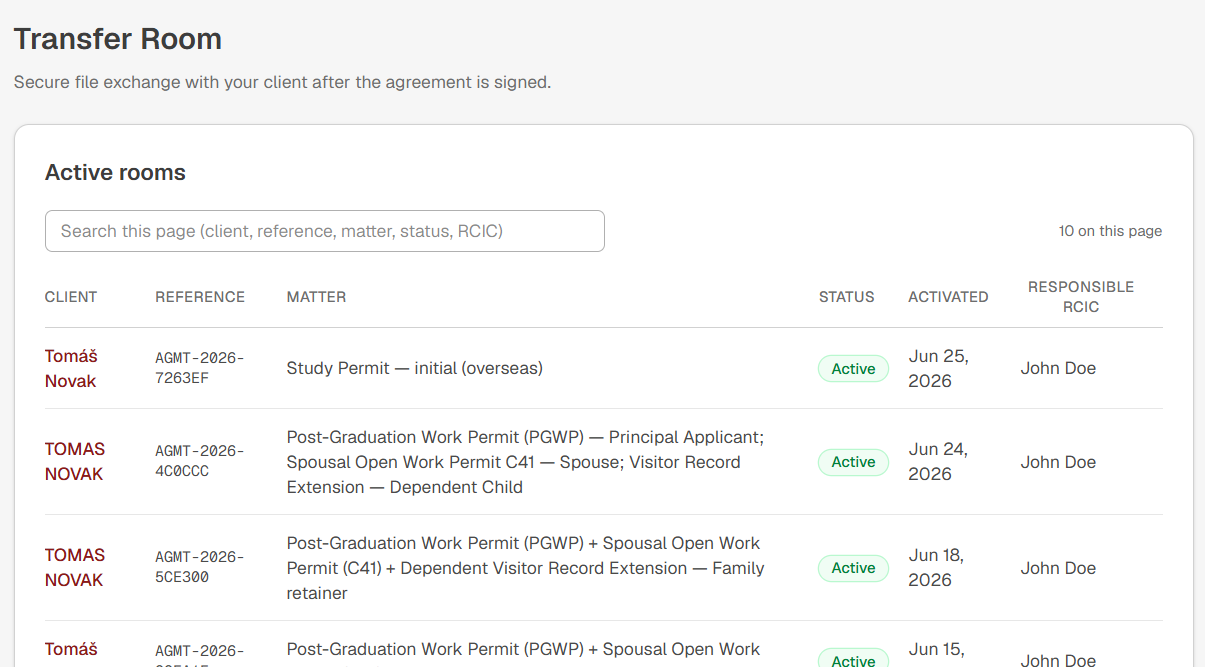
The columns, in detail
Client: the named primary client from the underlying Service Agreement, or the display name you set on an ad-hoc room. Rendered as a maroon link.
Reference: the agreement reference (AGMT-YYYY-XXXXXX) for SA-linked rooms; an AHX-prefixed reference or a custom string for ad-hoc rooms; a TRV-prefixed numeric for Phase 48 fax-routing rooms.
Matter: the matter type label from the underlying SA (for example 'Super Visa Application', 'Spousal Sponsorship Overseas', 'PFL Response') or 'Ad-hoc' for ad-hoc rooms.
Status: a green Active pill for live rooms; an amber Expired pill for rooms whose grace window has closed; a charcoal Revoked pill when you have manually revoked the room. Status is also exposed as a filter chip in the search box.
Activated: the date the room was activated, formatted in your tenant timezone. Hover for the full timestamp.
Responsible RCIC: the lead RCIC for this matter (from the underlying SA's main_rcic_member_id). Em-dash when ad-hoc or when no RCIC is set yet.
Search and filter
The search box accepts free-text and matches across client name, reference (full or partial), matter label, status, and RCIC name. The box is debounced at 300 ms so typing fast does not pound the server. The match runs server-side via PostgREST .or() over the canonical encrypted-blind-index columns where applicable (client_email_hash and reference) and over the plaintext columns where not (matter label, RCIC name).
Special status badges
When a Transfer Room was created by the Phase 48 fax inbound routing pipeline (an incoming fax arrived and was routed to your standing Incoming Faxes ad-hoc room), the row carries an additional 'Inbound fax' badge next to the status. Use this to spot fax-routed rooms in a list dominated by SA-linked rooms.
Pagination and per-member page size
From v1.18 onward, the Transfer Room list shows 10 rooms per page by default. Below the table, a Rows-per-page dropdown lets each teammate switch to 10, 25, 50, or All (capped at 500 to keep large tenants performant). Once you pick a size, it sticks across sessions for your account; another teammate on the same firm keeps their own preference.
Server-side, the list is always pre-sorted by 'most recently active first' so page 1 surfaces the rooms you are most likely to need. Clicking a column header (Client, Reference, Matter, Status, Activated, Responsible RCIC) reorders the rooms on the current page only. This keeps the page snappy and avoids re-fetching: if you want to find a specific old room, use the search box (which scans the whole tenant) rather than a column sort.
If you ever pick 'All' on a tenant with more than 500 rooms, an amber banner reminds you that only the 500 most recent are rendered, and suggests a smaller page size with Previous/Next navigation to page through the older ones. The cap is structural: keeping the DOM bounded means even very large firms stay responsive.
The TR Settings page (Owner only)
A new entry under the Transfer Room module, visible only to the Owner of the firm, gathers every tenant-wide control in one place: the default page size for the list, the tenant-wide viewer roster, and the default contacts roster. Teammates who are not the Owner can still see the sidebar item, but the page renders a friendly 'Owner-only' card with a link back to the Transfer Room list. The reason: every setting here affects how the module behaves for the whole firm, so changes go through one person by design.
Card 1: Default list size
The Owner picks the firm-wide default page size for the list page (10 / 25 / 50 / All). New teammates and anyone who has not customized their own preference will see the list at that size. Each teammate can still override locally from the list page; the tenant-wide default applies only when no personal preference has been written.
Card 2: Tenant-wide TR viewers
Lists every paid Assistant seat in your firm with a checkbox each. Tick a seat to grant them blanket Transfer Room access (described in the next section). RCIC seats and the Owner row are NOT shown, because RCICs already see every room they are named on and the Owner already sees everything.
Card 3: Default contacts
A saved roster of staff seats that surfaces as a quick picker on the Add Participant flow inside any Transfer Room. Full details in the 'Default contacts roster' section below.
Only designated accountants may confirm funds. This switch sits in the Accountant card, under the accountant picker, and is off by default. When it is on, only a designated accountant can confirm government-fee funds, mark a fee as not required, or reverse either; a verified RCIC no longer sees those buttons, but can still record that a client says they paid. It can be switched on only when at least one designated accountant is saved.
Designating accountants
The Transfer Room Settings page carries a Designated accountants card where the firm Owner can pick up to two team members to act as the firm's bookkeeping or payment-reconciliation contacts. Pick any combination of paid Assistant seats, RCIC seats, or the Owner themselves. The picker is Owner-only; everyone else sees the current list as read-only.
Designating a team member as an accountant does three things at once. First, it auto-grants tenant-wide Transfer Room access on every existing and future room in the firm. The designee can open any room from the list page, read the Information Card and the Matter Work Ledger, and download received files, even on matters they were not explicitly added to as a participant. Second, it grants write power on the new Payment Schedule and Milestones cards on every linked-SA room. The designee can tick installments as paid and milestones as reached, with their name and timestamp captured as the audit byline. Third, it routes the post-save signal emails from the Matter Work Ledger to that designee whenever an entry is marked as having reached a payment or milestone.
Sending transfers is deliberately NOT in the envelope. A designated accountant who is not also an explicit tenant-side participant on a given room cannot send files into that room. Adding files to client matters is a licensee or licensee-supervised decision; the accountant envelope is read-and-bookkeeping, not document-handling. If a designee also needs to send on a specific matter, add them as a tenant-side participant on that room through the existing Manage Participants flow.
Why two slots and not more. Most firms have one bookkeeper plus an Owner who occasionally takes over reconciliation. The two-slot cap keeps the audit ledger compact and the email fan-out predictable. If your firm has grown beyond that, rotate designees rather than expanding the list.
Tenant-wide TR viewer access
From v1.18 onward, the Owner can grant any paid Assistant seat blanket access to every Transfer Room the firm has open. The intent: support roles like Accounting, Marketing, or Processing often need to read or update specific cards across many matters without being added to each room one at a time. Rather than maintain a participant list of N rooms multiplied by M staff, you toggle one flag per Assistant on the TR Settings page.
What a viewer CAN do
Read every Transfer Room in the firm via the standard list page and detail page.
Scalar-edit fields on the Information Card on any room (names, dates, addresses, contact details, the Authority blocks, etc.).
Add, edit, and delete Matter Work Ledger entries on any room. The entry is stamped with the viewer's auth account in the audit metadata; the worker_participant_id column is left null since the viewer is not on the room's participant list, but the worker display name and billed role come from the viewer's company_members row.
Request AI code suggestions on the Matter Work Ledger (Premium-only, counts toward the shared 50-prompts-per-day quota).
Download files received in any room (the same access non-viewer participants have).
What a viewer CANNOT do
Send files to the client. The Send Files action returns a friendly 'tenant-wide viewers cannot send' message. This is a hard lock: even if a viewer is also listed as a participant on a specific room, the flag overrides the participant grant. By design, the licensee (your RCIC or co-counsel) owns every outbound transfer to the client.
Run the Information Card structural operations: pull-from-Service-Agreement, revert the last pull, add or remove family members, add or remove government authority blocks, AI auto-fill from an ID document, or request a client sign-in email change. These stay verified-RCIC only because they are either destructive (revert and pull-overwrite are wholesale field replacements) or roster-shaped (family and authority changes materially change who appears on the card).
Add or remove participants, edit notification rules, or change the per-side 'can delete' delete-authority flag. These remain verified-RCIC moves under Rule 50, because changes to who is on a Transfer Room belong to the licensee.
Receive new-transfer notifications by default. Viewers are not on the participants list, so the existing notification fan-out simply skips them. If a viewer wants to be paged on a specific room, the RCIC adds them as a participant with notify-on-new-transfer ticked, the regular way.
UI rendering for viewers
When a viewer opens a Transfer Room detail page, the Information Card editor surface looks almost identical to the RCIC view: scalar fields are editable. The structural buttons (Pull from Service Agreement, Revert pull, Add/remove family or authority, AI auto-fill from ID, Request client email change) are hidden entirely, not shown then disabled. This is intentional: hiding the controls keeps the viewer focused on the moves that are actually theirs, and prevents the click-then-error dead-end pattern.
Default contacts roster (and the Add Participant picker)
From v1.18 onward, the Owner can build a small saved roster of staff seats on the TR Settings page. Each row points to one company_members seat in your firm (Owner, RCIC, or paid Assistant) and carries an editable display label plus one of five role categories (Accounting, Marketing, Processing, Management, Other). The roster is the Owner's curation: pick the staff you most often add as tenant-side participants on Transfer Rooms.
How the picker prefills the Add Participant form
When a verified RCIC clicks 'Add participant' on the tenant side of any Transfer Room, the modal opens with a 'Pick from saved contacts' dropdown above the manual Full name / Email / Role label fields. Picking a contact prefills those three fields from the saved row; the RCIC can then tweak any field (for example, override the role label specifically for this room) before confirming. The picker only appears on the tenant side. On the client side (sponsor, family member, translator), there is no roster: every client-side participant is a per-matter addition.
Note: Default contacts have NO Transfer Room access of their own. Adding a seat to the roster does not silently grant them access to anything; the picker just saves typing. To grant a seat blanket access, use the 'Tenant-wide TR viewers' toggle on the same Settings page (see the previous section).
Display label is yours, email is locked to the seat
When you add or edit a contact, the form asks for: a Seat (required, picked from a dropdown of every member in your firm), a Display name (editable, prefilled from the picked seat's display name), and a Role (one of the five categories; the 'Other' role requires a short note explaining what the role is). The email field is read-only and shows the sign-in email of the picked seat. This guarantees the picker always prefills with the seat's actual login address, so notifications reach the address that person really uses and there is no mismatch between the room and the seat. Your staff reach the room through the dashboard; the client portal sign-in is for the client side only.
Each seat appears at most once in the roster
There is a hard unique constraint per tenant: the same seat cannot have two default-contact entries. The dropdown filters out seats that already have a row; the row you are editing is exempt from that filter (so its own seat remains pre-selected). If you ever try to re-add a seat that already has a row, the form returns a friendly 'that seat already has a default-contact entry' message and the underlying database constraint prevents the duplicate.
Refresh emails from seats
If a teammate updates their sign-in email in Settings > Team, the default-contact rows that point to their seat hold a stale snapshot until you re-save each row. To re-snapshot every row in one move, click 'Refresh emails from seats' on the TR Settings Card 3 toolbar. The button is Owner-only, runs through every contact, re-fetches the picked seat's current sign-in email, and updates the snapshot. An inline notice reports how many rows were inspected, how many were actually updated, and how many were skipped (typically seats without a linked sign-in account).
Seat removal cascades
If you remove a paid seat from your firm (Settings > Team), any default-contact row pointing to that seat is automatically deleted by the database foreign-key cascade. The roster cannot accumulate stale rows referencing seats that no longer exist.
Activation: automatic on Bill payment (Stripe webhook)
One of four ways a room comes into being. This section describes the automatic route. A room can also be activated by hand from the agreement, created as an ad-hoc room with no agreement at all, or registered from an agreement RCIC App did not create; see “Activation: an agreement RCIC App did not create” below.
The canonical path. When the auto-generated Bill (from Bill on Signing) is paid through Stripe Checkout, the Stripe webhook delivers a checkout.session.completed event to /api/webhooks/stripe with metadata.invoice_id pointing at the bill row. The webhook handler looks up the Service Agreement that owns the bill via service_agreements WHERE auto_bill_invoice_id = invoiceId, resolves the effective agreement (amendments resolve to their parent), and calls activateTransferRoom(admin, companyId, effectiveAgreementId, source='stripe_payment', reason=null).
What happens at activation time
INSERT a transfer_rooms row keyed UNIQUE on (company_id, agreement_id) so two concurrent calls cannot create duplicate rooms. A 23505 race-loss caught in code re-reads the existing row and returns alreadyActive=true.
Extract participants from the parent SA: the named client becomes the client-side primary participant (notify=true, can_delete=true); the sponsor becomes a participant if isAlsoClient or disclosureAuthorized was ticked; the designated person becomes a participant if signerKind is designated_signatory. Family members are NOT auto-added because SaFamilyMember does not carry an email.
Default tenant-side participants: main RCIC (always, primary, notify=true, can_delete=true), co-counsel if assigned on the SA (notify=false by default; tenant adjusts later), company Owner (always, notify=false). The third 'assigned assistant' slot stays null until the RCIC sets it on Manage Notifications.
If your tenant has a Drive connection (Google Drive or Microsoft 365 OneDrive), provision the case-folder tree under RCIC App > Clients > {client name} > {seven subfolders}. Cache every created folder id on the transfer_room_drive_folders row so the auto-route step on subsequent transfers does not re-create folders.
Copy the signed Service Agreement PDF to the Contract subfolder automatically. Failures here are non-blocking; the room is still active even if the copy fails (re-try is manual from the agreement detail page).
Emit a room_activated audit event with source='stripe_payment'. Send a tenant-side notification email (the main RCIC plus any other notify=true participants) framing 'A new Transfer Room has been activated for <client name>.' Send the client their account invitation, naming the new portal URL and asking them to choose a password. Activation is one of the two moments an invitation goes out on its own; adding a client-side participant later is the other.
Set the active file review hook if this SA was generated from an AFR (source_kind='active_file_review'); the AFR advances to its next status accordingly.
Note: Stripe retries failed webhook deliveries for up to three days at exponential backoff. activateTransferRoom is idempotent at the UNIQUE constraint level, so even five retries land at most one room creation. The original Stripe webhook URL gotcha (after the rcicapp.ca domain rebrand, webhooks pointed at app.investatech.com which did not 308-follow) is closed: both Stripe endpoints (Connect + Platform) now point at https://rcicapp.ca/api/webhooks/stripe directly.
Activation: manual from the agreement
The escape hatch. Not every fully-signed SA gets paid through Stripe Checkout: a tenant might accept payment outside Stripe (e-Transfer, cheque, wire), might defer payment until the matter starts, might waive payment under a pro-bono or legacy arrangement, or might activate as an internal decision. The Manual activation flow lives on the Service Agreement detail page; a maroon 'Activate Transfer Room' button appears once the agreement is fully_signed.
The seven reason values
paid_outside_stripe: client paid via e-Transfer, cheque, wire, or cash. The funds are confirmed in your trust account; the Bill in Single Bills should be marked paid manually as well.
payment_deferred: the engagement starts before payment lands (you are accommodating the client on a documented payment plan in the Schedule). The Bill is sent but unpaid; activate the room so the matter can move forward.
payment_waived: no payment will be collected at all on this agreement. Distinct from pro_bono in that the matter is genuinely fee-free for an internal reason (a goodwill gesture, an apology rebate, an internal training matter).
pro_bono: the Service Agreement was signed in Pro bono mode. The room activates without a Bill ever being created.
legacy_matter: a returning client whose initial work was done before you were on the platform. You signed an SA on the platform for the continuing work and want a room for the historical record. The Bill auto-generation may or may not have fired depending on the SA shape.
internal_decision: a catch-all for any other deliberate manual activation that does not fit a more specific reason. Use it sparingly; future readers of the audit ledger will want context.
other: requires a free-text notes field explaining the reason. The notes field is mandatory when other is picked and lands in the audit ledger as part of the activation event payload.
What the activation modal asks for
A radio group of the seven reason values. A notes field (required when reason is other, optional otherwise). A confirm-by-typing-the-agreement-reference safety check when the SA is high-value (the threshold is half the platform's median professional fee for that matter category). On submit, the platform records the reason and notes on the activation event payload, runs the same activateTransferRoom helper the Stripe webhook would have run (so the same idempotency + same participant extraction + same Drive provisioning + same emails), and lands you on the new room's detail page.
Where the reason shows up afterward
On the room detail page, an 'Activation details' card under the matter header surfaces the activation source ('Manual activation' or 'Stripe payment') and the reason ('Legacy matter', 'Paid outside Stripe', etc.). When the reason is other, the notes also render. The audit ledger keeps the full payload immutably so a later review can reconstruct who activated when and why.
Activation: amendment piggyback on the parent room
Amendments do NOT create a second Transfer Room. The parent agreement's room is the canonical room for the matter; every amendment to that SA shares the same room. The helper getEffectiveTrAgreementId(agreement) is the resolution chokepoint: it returns agreement.parent_agreement_id when the agreement is an amendment, agreement.id otherwise. Every TR code path that looks up a room by agreement id (Stripe webhook activation, manual activation, agreement-detail Activate button, participant extraction, Drive folder lookup, audit-event payload) MUST resolve through this helper.
What this means in practice
A second-amendment SA whose Bill gets paid does NOT activate a second room. The Stripe webhook resolves the agreement to its parent and finds the existing room (UNIQUE constraint catches the would-be duplicate).
The signed amendment PDF is auto-copied to the Contract subfolder in the existing room's Drive tree, alongside the parent signed PDF. The Drive tree never re-provisions for amendments.
Participants do NOT re-extract on amendment activation. If the amendment added a new co-counsel or removed an existing one, you adjust participants manually from the Manage Participants page.
The activation audit event is still emitted for the amendment with a source value of stripe_payment_amendment or manual_amendment, so the ledger captures every payment cycle even though only one room exists.
Important: Do not amend an amendment expecting a fresh Transfer Room. The CICC Code expects one matter, one engagement, one canonical case folder. Amendments-of-amendments are not supported by design (the platform refuses to amend a row whose agreement_kind is already amendment). If the matter has structurally changed enough to need a new room, end the old engagement and start a fresh Service Agreement.
Ad-hoc Transfer Rooms (no Service Agreement)
Ad-hoc Transfer Rooms exist for file exchanges that do not have a Service Agreement attached. Common use cases: a returning client sending you a document for a future intake before you have drafted a new SA, a co-counsel exchanging a memo with you outside a single matter, a prospect's pre-engagement document share, or the platform-managed Incoming Faxes room every tenant gets when fax receive is on. Ad-hoc rooms are created from /dashboard/transfer-room/ad-hoc by clicking 'Create ad-hoc room'.
What an ad-hoc room carries
is_ad_hoc=true on the transfer_rooms row. Used by every downstream surface to gate ad-hoc-specific behaviour (skip the Information Card, skip the Matter Work Ledger, separate Drive folder root, etc.).
A custom display name you set at creation time (a person's name, a matter type label, a co-counsel name). Renders in the dashboard list as the client column and on the room detail page as the header title.
An AHX-prefixed reference (ad-hoc plus a 6-character random hex tail) instead of an AGMT reference. Phase 48 fax-routing rooms use a TRV-prefixed numeric instead.
An ad_hoc_created_by_user_id column pointing at the team member who created the room (Owner or RCIC; assistants cannot create ad-hoc rooms by default).
A manual_activation_reason of 'ad_hoc_perk' (mig 114 widened the CHECK to accept this value). Activation is always Manual; ad-hoc rooms do not come from Stripe webhooks.
An ad-hoc Drive folder root: RCIC App > Ad-hoc Transfer Rooms > {room display name} > {YYYY-MM-DD in tenant timezone}, flat (no seven-folder subtree). Owned exclusively by lib/transfer-room/drive-adhoc.ts per Rule 50 JSONB ownership.
What an ad-hoc room does NOT have
No Information Card. The card is only meaningful with an underlying matter; ad-hoc rooms render the detail page without the Information Card section.
No Matter Work Ledger. Time tracking ties to a matter; ad-hoc rooms render without the ledger card. Deferred for future work that would let you track time against ad-hoc rooms too.
No Pull from Service Agreement. The Information Card's pull button is absent (no parent SA to pull from).
No auto-bill, no Bill on Signing, no automatic SA-tail activation event. Ad-hoc rooms are independent of the Service Agreements lifecycle entirely.
No back-link to a Service Agreement. The dashboard list reference column carries the ad-hoc reference but clicking through lands you on the room detail page only; there is no parent SA to navigate to.
Phase 48 fax-routing rooms
Every tenant who turns on fax receive gets exactly ONE standing ad-hoc Transfer Room called 'Incoming Faxes' (or 'Télécopies entrantes' in French dashboards). It is lazy-created on the first inbound fax that successfully routes to your tenant: the inbound webhook decodes the QR code on the cover sheet, recognizes your tenant code, looks up the room, creates it if missing, and lands the fax PDF as a tenant_to_tenant transfer in the room (cover-sheet-stripped if your settings ask for it). Subsequent inbound faxes route to the same room. The room is permanent; you do not delete or revoke it through the normal flows.
Note: Ad-hoc Transfer Rooms remain Premium, like SA-linked rooms. A Basic tenant cannot create an ad-hoc room from the dashboard, and the Phase 48 fax routing pipeline refuses to land an inbound fax on a Basic tenant.
The room detail page, anatomy
Click any row on the list page and you land on /dashboard/transfer-room/<roomId>. The page is structured into a vertical stack of cards. From top to bottom: a Back to Transfer Rooms breadcrumb, the matter header card, the Status card, the Message Board, the Information Card (SA-linked rooms only), the Matter Work Ledger card (SA-linked rooms only), the Sent / Received tabbed area, the Drive settings card, the Manage Participants link, the Manage Notifications card, the CC recipients card, the Audit log tab, and (when there's quarantine) the Inbound Review card.
Matter header card
Top of the page. The client display name as the H1 (maroon). Below the H1, a single-row metadata strip: Reference, Matter, Activated (full timestamp in your tenant timezone with 12-hour clock), Participants count. A status pill on the right (green Active, amber Expired, charcoal Revoked, plus the Inbound fax sibling badge when applicable). The header is sticky on long pages.
Status card and Message Board
Below the matter header, on every room that carries a matter; ad-hoc rooms show neither card. The Status card has two rows. Case status is where the matter itself stands, with its own Change button; where a colleague proposes a change instead of applying one, it waits for the RCIC to approve it. Room status is how the matter is being paid for: a room activated from a paid bill reads Active, and a room you activated yourself reads the basis you chose, such as Payment deferred, Pro bono or Legacy. Payment deferred is the only basis that carries a due date, and the card turns red once that date has passed. Below the Status card sits the Message Board, where the main contact on each side can post a short note the other side sees and your side can send a reminder. The Message Board is shared, so your client sees it on the portal; the Status card is yours alone. The audit ledger still holds the canonical immutable record of how and why the room was activated.
Sent / Received tabs
Below the Matter Work Ledger card (or directly below the matter header card on ad-hoc rooms, which carry neither). A two-tab strip: Sent (transfers your team has sent to the client; default tab) and Received (transfers the client has sent to your team via portal upload or inbound email). Each tab carries a count badge. Inside each tab, the transfers list shows rows with subject, files-attached count, sent-at timestamp, viewed-by-recipient flag, downloaded-by-recipient flag, and inline buttons (View, Download all, Copy to Drive on Received, Revoke on Sent). A maroon 'Send files' button at the top right of the Sent tab opens the Send Files modal.
Drive settings card
A small card showing whether Drive is connected, the provider (Google Drive or Microsoft 365 OneDrive), the folder naming pattern (the default is '{client_full_name} - {sa_reference}' but you can customize), and a Connect / Reconnect button. When unconnected, the card explains that file copies to Drive are paused and shows a Connect button that walks through the OAuth flow at Settings -> Drive integration.
Manage Participants and Manage Notifications
Two cards (and one link in the room sidebar) for participant management and notification routing. Manage Participants opens a side panel listing every tenant-side and client-side participant with per-row toggles (notify on new transfer, can_delete) and per-row action buttons (Resend invitation, Edit email, Revoke). Manage Notifications carries six toggles per tenant-side participant (notify on new transfer / on viewed / on downloaded / on revoked / on copy-to-Drive failure / on OTP request) and a CC recipients editor.
Audit log tab
An always-present tab on the detail page that lists every audit event on this room, paginated cursor-style 50 rows at a time. Each row carries an event label (about 50 friendly labels covering every recorded action; see the Audit log section below for the full catalogue), the actor (a user, a participant, or the system), a redacted IP address (/24 CIDR), and a UTC timestamp. The Inbound Review card mounts above the audit log when there is at least one quarantined inbound email on this room awaiting review.
Participants: per-side cap of three and defaults
Every Transfer Room has two sides: tenant (you and your team) and client (the named client and their people). Each side carries up to THREE named participants. The cap is enforced both client-side (the Manage Participants UI hides the Add button at three) and server-side (the POST route returns a 409 with side_cap_reached when an over-the-cap insertion is attempted). Three is the practical limit for a small-team plus a small-client-circle exchange; if your matter genuinely needs more people on the same room, end the room and start over with a fresh activation under a renegotiated SA.
Default tenant-side participants on activation
Slot 1: the main RCIC on the agreement (main_rcic_member_id). Primary contact, notify=true, can_delete=true. Cannot be revoked while the room is active; if the RCIC leaves the firm, you reassign by editing this slot.
Slot 2: the co-counsel if one was assigned on the SA, or the company Owner if no co-counsel. notify=false by default so the co-counsel does not receive every notification (the lead RCIC routes); the RCIC opts the co-counsel into specific notifications via Manage Notifications.
Slot 3: the assigned assistant if you have specified one, or the company Owner if not. notify=false by default. This slot is the easiest to swap out as your team composition changes; assistants come and go but the matter stays.
Default client-side participants on activation
Slot 1: the named primary client from the SA. is_primary_contact=true, notify=true, can_delete=true. Always present; cannot be revoked (you cancel the room instead).
Slot 2 (conditional): the sponsor when the SA's Sponsor block had isAlsoClient=true OR disclosureAuthorized=true. notify=true. The sponsor is treated as a co-Client when isAlsoClient is true and a permissioned third party otherwise.
Slot 3 (conditional): the designated person when the SA's signerKind was 'designated_signatory'. notify=true. Functions as a substitute signer in the SA and a substitute contact on the TR.
Note: Family members do NOT auto-extract as TR participants because SaFamilyMember does not carry an email field. Add them manually on Manage Participants when a specific family member needs to receive transfers or upload documents directly. The disclosure-authorized family member from Section 37 of the SA is the canonical add candidate.
Adding and removing participants
Adding or removing a participant on a Transfer Room is a verified-RCIC action. The Code of Professional Conduct section 26 governs how licensees handle confidential client information, and adding a third party to a confidential file is a Code-relevant decision that requires authorization from a regulated person (your RCIC) plus a structured consent attestation recorded on the audit ledger. Owners and admins who are not also verified RCICs cannot add or remove participants; the modal renders a 'You must be a verified RCIC to manage participants' notice instead.
Add a participant: two-step flow
Step 1: a form. Pick the side (tenant or client), pick the role (RCIC team for tenant; main client / family / sponsor / co-counsel / translator-or-interpreter / authorized third party / other for client), enter a display name and an email, pick a reason from the side-aware enum (see below), and type an optional notes field (required when reason is 'other'). Step 2: a confidentiality consent panel. Read and tick a single checkbox attesting that you have obtained the necessary authorization and that adding this participant is consistent with Code section 26. The Add button is disabled until both steps are complete; on confirm, the participant row is INSERTed and a participant_added audit event is emitted with the consent triple {reason, reasonNote, consentAttested} as part of the payload.
Side-aware reason enums
Tenant side: team-composition (an internal restructure), co-counsel-added (you brought in a second RCIC), co-counsel-removed (the co-counsel is leaving), translator-or-interpreter (added for language reasons), operational-correction (a previously-omitted person should have been on day one), other (free-text notes required).
Client side: authorized-third-party (a person the client has consented to bring into the file), family-or-sponsor (a family member or the sponsor when they did not auto-extract from the SA), no-longer-authorized (a previously-added person whose authorization has been withdrawn, revoke flow only), client-revoked-consent (the client has explicitly revoked their consent to share information with this person, revoke flow only), operational-correction (a previously-omitted person), other (free-text notes required).
Revoke a participant
Click Revoke on a participant row. A single confirmation modal asks for a reason from the side-aware revoke enum and an optional notes field. On confirm, the participant row gains a revoked_at timestamp + a revoked_reason + a revoked_by user id (soft-delete; the row is not physically removed). The portal-token hash is invalidated and the participant row is marked revoked. Both ways in close at once: the revoked person can no longer request a one-time code, and if they have an account it loses this room on their very next request rather than at their next sign-in. Their other matters with your firm are untouched. A participant_revoked audit event is emitted with the same consent-triple shape. A partial unique index enforces that no two non-revoked participants on the same side of the same room share a normalized email; the partial-on-revoked_at-IS-NULL shape lets you re-add a revoked person later (re-authorization).
Important: The consent attestation is recorded on the audit ledger as a structured field (consentAttested=true plus the actor's user id) so a later CICC review or court proceeding can demonstrate that the licensee took the Code section 26 attestation step on each participant change. Do not normalize this away as a UI nicety; it is regulatory paperwork.
Per-side can_delete privilege
Every participant carries a per-row can_delete boolean (added in mig 134, backfilled true for is_primary_contact=true rows). The flag gates whether the participant may REVOKE a transfer that originated from their own side. The primary client can revoke a transfer they sent (a typo, wrong file, oversharing); the lead RCIC can revoke a transfer their team sent. A non-primary family member added later defaults to can_delete=false; they can view and download transfers but cannot revoke them. The RCIC adjusts the flag per row via Manage Participants when the matter calls for it.
Dashboard /api/transfers/[id]/revoke requires (caller is on the tenant side) AND (caller has can_delete=true) AND (transfer.direction = 'tenant_to_client').
Portal /api/portal/transfer-room/transfers/[transferId]/revoke requires (session participant is on the client side) AND (session participant has can_delete=true) AND (transfer.direction = 'client_to_tenant').
Direction mismatch returns 403. You revoke your own side's transfers, not the other side's.
UI button visibility mirrors the gate: dashboard Sent Revoke button only renders when can_delete; portal Sent-list Delete button only renders when canDelete. The server route is the authority.
The Send Files modal
Click 'Send files' on the Sent tab. A modal opens with three field groups: the message (subject + rich-text body), the files (one or more, each individually encrypted), and the timing (Send now vs Schedule for later). The Send button at the bottom right is disabled until at least one file is attached and the subject has content. Files are uploaded in encrypted form over a signed-URL pattern (the transfer-room private bucket from mig 104); the body of the POST request stays under the Vercel 4.5 MB request body cap by sending only metadata + a presigned upload URL handshake.
The subject field
A single-line input. Becomes the email subject on the notification email sent to client-side participants. Use it as you would an email subject: short, descriptive, action-oriented. Examples: 'Drafts for your review on the IMM 5645 sponsorship undertaking', 'PFL response submitted to IRCC; copy for your records', 'Acknowledgement of receipt from CBSA, please confirm receipt'. Mandatory; the validator emits an inline warning if you try to submit with an empty subject.
The file picker
Drag and drop OR click to browse. Multi-file selection is supported on the same drop or browse action.
Per-file size cap: 110 MB (the transfer-room private bucket cap from mig 104). Per-modal cap: 500 MB total. The picker warns inline when either is exceeded.
MIME allowlist: PDF, Word (docx, doc), Excel (xlsx, xls), PowerPoint (pptx, ppt), images (JPG, PNG, HEIC, TIFF), plain text, CSV, generic application/octet-stream. The macro-enabled siblings (.docm, .xlsm, .pptm) are deliberately rejected per the Phase 47B anti-malware recommendation.
Each attached file gets a remove button on its row plus a per-file rename input so you can clean up filenames before sending (the encrypted upload writes the renamed filename to the metadata).
Important: Filenames are encrypted at rest along with the file bytes; a SaaS-admin browse of the storage bucket sees UUID-only paths and ciphertext. Be careful with internal filenames that contain matter-sensitive identifiers (UCI numbers, IRCC application numbers, redaction states); the client will see the filename as you uploaded it, because the recipient gets the decrypted filename on download.
The rich-text editor (TipTap)
The Message field is no longer a plain textarea. It is a TipTap rich-text editor with a fixed toolbar exposing bold, italic, underline, ordered and unordered lists, headings (H2 + H3), inline code, hyperlinks, and a blockquote variant. The content you type becomes the BODY of the outbound notification email sent to client-side participants; it is no longer an internal note. Paste from Word and the formatting comes across cleanly (bullet lists, headings, bolding all preserved); paste from Google Docs and the same. Paste from a plain-text source and the editor stays plain.
Server-side sanitization
Whatever you produce in the editor is sanitized server-side before it lands in the email and the transfer record. We run isomorphic-dompurify (with the jsdom fallback for the Node.js side) over the HTML output to strip script tags, inline event handlers (onclick, onmouseover, onload), iframe, object, embed, javascript: URLs, data: URLs except for safely-encoded images, and any tag attribute that could be used for XSS. The whitelist is conservative: only the formatting tags above plus a-href with http and https hrefs survives the sanitizer. A client who receives the email cannot be tricked into executing code through a malicious HTML message body.
Quote and threading
When you click 'Send files' from a Received transfer (in reply to something the client sent you), the editor pre-fills with an 'On <date>, <client name> wrote:' header plus the client's previous body as a blockquote. You write above the quote; the client's email client (when they reply via the Reply-To address) understands the structure and threads the conversation. Use the blockquote button to quote a specific paragraph from a longer received message.
AI assist (Gemini 2.5 Flash) in the message editor
A maroon AI button sits in the editor toolbar. Click it to open an AI assist panel with three actions running through Gemini 2.5 Flash: Help me write (draft from scratch given a short brief), Edit this (polish tone, tighten writing, fix grammar on the current draft), and Translate (convert the message to or from Quebec French). All three return a draft into the editor where you can review before sending. The AI never sends on your behalf; it always returns text for human review first.
Screenshot inputs (up to two per call)
Each of the three AI actions accepts up to two screenshots alongside the text prompt. Drop or paste an image into the AI prompt panel and Gemini sees both the text AND the images. Useful when you are describing a portal screen, a document the client sent, an IRCC letter you received, or any context that would otherwise require translating to words. The model is multimodal; it ingests image content directly through the contents array. Images never enter the message itself, the email, or persistent storage; they are context for the AI prompt only and are discarded after the API call completes.
Premium: AI assist counts toward your daily AI quota (50 calls per day on Premium, shared with the AI Assistant, the SA AI Populate and AI Review, and the Matter Work Ledger code suggester). The Help me write action consumes one quota slot per call; Edit this and Translate consume one quota slot per call too. The editor still works without AI assist when your quota is exhausted; only the AI button is disabled.
Scheduled send for later
The Send Files modal carries a 'Send now / Schedule for later' toggle (Phase 47C, mig 140). Picking 'Schedule for later' reveals a date picker and a time picker. Pick a date and a time in your tenant timezone with 15-minute granularity (the cron drains scheduled sends every 5 minutes, so finer granularity would not improve responsiveness). The maximum lead time is 60 days; the validator rejects schedules further out.
The transfer row is created at status='scheduled' with scheduled_send_at (timestamptz, computed from your wall-clock + tenant timezone) and scheduled_send_timezone (the tenant timezone identifier).
Files are encrypted and uploaded immediately. They live in the storage bucket from save time onward; the scheduled cron does NOT defer the upload, only the email send and the visibility-to-client flip.
On the Sent tab, the transfer row shows a 'Scheduled' status pill (amber). A 'Cancel scheduled' button cancels the scheduled row (returns it to status='revoked' with sent_at = NULL; UI labels this as 'Cancelled' rather than 'Revoked'). A 'Reschedule' button opens a date+time picker to move the row to a different scheduled time.
When scheduled_send_at falls due, /api/cron/transfer-room-scheduled-sends (runs every 5 minutes) drains it: flips status to 'sent', stamps sent_at, dispatches the same email + audit fan-out the immediate send would have done. Race-loss against a concurrent cancel is handled by checking status='scheduled' inside the cron's UPDATE.
Note: Use scheduled send for time-sensitive reminders (IRCC expects your response by a specific date; you send the package a week ahead so the client has time to review), for end-of-day follow-ups that should land in the client's morning, or for cross-timezone clients where your morning is their evening. Not a replacement for the calendar; for hard deadlines a week out, set a calendar reminder for yourself AND a scheduled send.
The Received tab
The Received tab on the room detail page shows every client_to_tenant transfer: files the primary client uploaded via the portal, files added by a client-side participant other than the primary, and files that arrived via the inbound email pipeline (an email reply with attachments). Each row carries the sender display name, the subject (which for inbound emails is the email's Subject header), the file count, the received-at timestamp, and inline buttons: View (opens the transfer detail panel), Download all (zip of every file decrypted server-side), Copy to Drive (copies the files into the room's Drive subtree), Revoke (only when the caller has can_delete on the client side and the transfer originated on the client side).
Copy to Drive
Click Copy to Drive on a Received row. The platform reads each file from the encrypted bucket, decrypts under your tenant DEK in function memory, and copies the plaintext to the Client Docs subfolder of the room's case-folder tree, under a date-suffixed subfolder (YYYY-MM-DD in your tenant timezone). The file's plaintext bytes never leave your tenant's Drive account; the encryption envelope was server-side only. Idempotent on the file's SHA-256 + Drive folder id pair, so re-clicking does not create duplicates. A 'Copied to Drive' indicator renders on the row after a successful copy.
Bulk Copy all to Drive
A maroon 'Copy all to Drive' button at the top of the Received tab runs the Copy to Drive action across every Received transfer that has not already been copied. The flow opens a warning panel showing the count, a real progress bar (updated per-file via useRef so the in-flight async loop can be cancelled by a Stop button without React state drift), and a Stop button that stops the loop cleanly at the next file boundary. Failures on individual files surface as inline error rows; the loop continues past them. Useful when you have inherited a room with a backlog of inbound transfers that have not been routed to Drive yet.
Client portal: the OTP gate
This describes the older one-time-code sign-in, which is still live. Clients now reach the portal with an account instead. A room keeps accepting one-time codes until every client on that room has set an account up, and only then stops offering them; ad-hoc rooms have no Service Agreement and no client account behind them, so they use this path permanently. Everything below is exactly how that path works, including the caps.
The client portal lives at /portal/transfer-room (no parameters; the participant identifies themselves through the OTP gate). Authentication is two-stage. Stage 1: the client enters their email plus the Service Agreement reference (AGMT-YYYY-XXXXXX for SA-linked rooms, AHX-XXXXXX for ad-hoc rooms, TRV-NNNN for fax-routing rooms). The platform looks up a participant whose normalized email + room reference match and whose revoked_at IS NULL. On match, the platform generates a six-digit code, hashes it, stores the hash on transfer_room_portal_otps, and sends the plaintext code via email to the participant's email. On no match, the platform returns a generic 'we sent a code if your details matched' message; no user enumeration.
Stage 2: the client enters the six-digit code on the same form. The platform hashes the entry, compares to the stored hash within the validity window, and on success issues a session cookie. The cookie is HMAC-signed under the master key with the domain prefix 'tr-portal-session-v1:' (Rule 18, versioned domain prefix so a leaked token cannot validate against any other module's portal). The cookie payload is { transferRoomId, participantId, email, issuedAt, expiresAt, rid (the room id, cross-checked on every API call) }. The cookie expires after 30 minutes of inactivity and renews on every authenticated request via a sliding-window heartbeat.
Anti-abuse limits
OTP validity: 10 minutes. After 10 minutes the code is expired; the client must request a new one.
Attempt cap: 5 failed code entries within the validity window before lockout. The lockout lasts until the next OTP request succeeds.
Cooldown between requests: 60 seconds. Prevents brute-force OTP request flooding.
Daily cap: 10 OTP requests per (participant, room) per 24-hour rolling window. A client who genuinely needs more is rare; for those cases the tenant Resends an invitation from the Manage Participants UI which rotates the OTP backing slot.
Note: The OTP email is sent through the same RCIC-App branded transporter as every client-facing email (Reply-To: your company email). The email subject reads 'Your access code for the file room of <client name>' or its French equivalent. The body carries the 6-digit code, a 10-minute validity reminder, and a 'did not request this?' contact line.
Client portal: what the client sees
Once the client has signed in, with their account or with a one-time code on a room that has not converted, they land on the authenticated portal. What follows is the same either way. The page is structured like a thin mirror of your dashboard room: a header with the room reference and a Sign out button, a Sent / Received tab strip (from the CLIENT's point of view: Sent = what the client has sent to you, Received = what your team has sent to the client), a notifications preferences card, and a security card with a Change my sign-in email link. There is NO Information Card, NO Matter Work Ledger, NO Drive settings, NO Manage Participants on the client portal; those surfaces are tenant-only.
Viewing and downloading a tenant_to_client transfer
On the Received tab (from the client's perspective), each row carries the subject, the file count, the date your team sent it, and a maroon View button. Click View: a side panel opens with the rich-text message body (sanitized) and a list of files. Per-file Download buttons stream the decrypted bytes server-side under your tenant DEK and the browser saves the file. A Download all button zips every file (decrypted) into a single archive. The platform stamps a transfer_viewed audit event the first time the client opens a transfer, and a transfer_file_downloaded event for every individual file download (so the audit log shows precisely which files were retrieved).
Sending a client_to_tenant transfer
A 'Send to your consultant' button on the portal Sent tab opens a simpler version of the Send Files modal: subject (free-text), message (plain textarea; no rich-text editor on the client side), and the file picker (same MIME allowlist, same 110 MB per-file cap). The client uploads, the platform encrypts under your tenant DEK on the way into storage, and a tenant-side notification email goes to every notify=true tenant participant on the room. The reply email is also subject to the same Reply-To routing so a tenant reply lands back in the room (closing the loop).
Change my sign-in email
On the portal security card, the primary client can request a sign-in email change. The flow is 'verify before swap': the client types the new email, the platform sends a 6-digit code to the new email, the client enters the code on a small modal, and on confirm the participant row's email is updated. The OLD email keeps working until the client confirms; the swap is atomic on the confirm step. After the swap, any open portal session whose cookie payload still carries the OLD email is invalidated on the next portal API request (the API cross-checks session.email against the participant row).
Browser support
Chrome 91+, Edge 91+, Firefox 105+, Safari 16.4+. The signed-URL upload path requires fetch + ReadableStream + the modern Blob API; older browsers see a 'your browser does not support this' card with the supported-minimums list. The OTP gate itself works on older browsers (no signed-URL needed for the OTP form) so even an older browser can VIEW transfers; they just cannot upload.
Drive sync: Google Drive or Microsoft 365
Drive integration is owner-only on a per-tenant basis. Each tenant connects either Google Drive or Microsoft 365 OneDrive (not both at the same time; the platform supports either provider but the per-tenant connection is single). The OAuth handshake happens at Settings -> Drive integration. Google Drive uses the drive.file scope (the platform can only see files it creates; no access to your existing Drive content); OneDrive uses Files.ReadWrite under the same principle.
The case-folder tree v2 (mig 127)
On activation of an SA-linked room, the platform creates a seven-folder case tree under RCIC App > Clients > {client folder name}. The seven subfolders are: Contract (signed Service Agreement PDFs and amendments), Pre-contract consultation (intake notes, AFR triage reports, written consultation tickets), Client Docs (anything the client uploads via the portal or sends via inbound email), RCIC Docs (anything your team sends to the client; auto-routed via the Send Files modal), Application (the actual IRCC submission packet you build), Government Communications (replies from IRCC, CBSA, IRB, provincial authorities), Identification (passport scans, driver's licences, government IDs).
What auto-routes where
Signed Service Agreement PDFs (including signed amendments): Contract subfolder. The renderer auto-routes the signed PDF on transition to fully_signed.
RCIC-sent transfers (tenant_to_client): RCIC Docs subfolder under a date-suffixed sub-subfolder (YYYY-MM-DD in your tenant timezone). Auto-routed on every send.
Client-uploaded files (client_to_tenant): NOT auto-routed. You manually click Copy to Drive on the Received tab when you want the file in your Drive. This is by design; the client may upload draft material you do not want in the canonical Drive record.
Inbound email transfers (from the AWS pipeline): same as client_to_tenant. NOT auto-routed; you Copy to Drive manually when ready.
AFR completion-deliverable PDFs: when this room is for an SA generated from an AFR, the final deliverable PDF lands in Application subfolder at AFR completion time.
Idempotency and dedup
Every Copy to Drive operation is idempotent on SHA-256(file bytes) + Drive folder id. Re-clicking the same Copy to Drive button on the same file does not create a duplicate; the operation no-ops and the row keeps its 'Copied to Drive' indicator. The hash is computed in function memory at copy time (we have the decrypted bytes anyway) and stored on the transfer_files row alongside the Drive file id. The same dedup logic protects the auto-route step on RCIC sends: re-fanning out a notification that already auto-routed to Drive does not double-create.
Note: Disconnecting Drive (Settings -> Drive integration -> Disconnect) pauses every auto-route and every Copy to Drive button. Existing Drive files are NOT deleted from your Drive (the platform never reaches into your Drive to delete anything; that is the drive.file scope guarantee). Re-connecting Drive resumes auto-route from that point forward; previously-failed auto-routes are NOT replayed automatically (manual Copy to Drive on the affected rows is your recovery path).
Drive folder naming pattern
The default client folder name is '{client_full_name} - {sa_reference}' (mig 107 flipped this from the broken default that referenced a non-existent client_reference column). You can override the pattern on a per-tenant basis on the Drive settings card. Available tokens: {client_full_name} (the named primary client from the SA), {sa_reference} (the AGMT-YYYY-XXXXXX reference), {matter_type} (the matter type label), {activated_year} (the four-digit year of activation), {activated_month} (the two-digit month).
Legacy {client_reference} token
The pre-mig-107 default used the {client_reference} token which never resolved to a real column. Tenants whose pattern still carries the legacy token see it aliased server-side to {sa_reference} via applyFolderPattern so existing tenant overrides keep producing meaningful folder names. New patterns use the canonical token; do not introduce {client_reference} in new patterns.
Layout version v1 versus v2
Rooms activated BEFORE mig 127 ran (Phase 47 deployment) carry layout_version=1 and use the older Docs by Client / <YYYY-MM-DD> layout (a single flat date-bucket subfolder per client; no seven-folder case tree). These v1 rooms stay on the v1 layout FOREVER; mig 127 does not retroactively reorganize existing rooms. Rooms activated after the migration land at layout_version=2 (the seven-folder case tree). Send-side auto-copy ONLY fires on v2 rooms; v1 rooms keep the manual Copy-to-Drive Received-tab pattern in both directions. When you adopt a new v2 subfolder in a future release, the four coordinated changes spelled out in mig 127's MAINTENANCE NOTE apply.
Encryption and storage architecture
Transfer Room shares the same Phase Encryption-1 posture as Service Agreements. Each tenant carries a unique data-encryption key (DEK), generated lazily at first encryption-aware write, wrapped under a master key-encryption key (KEK) that lives in Vercel environment variables. The DEK is the same key used for SA client identity columns, AFR PII columns, the Information Card's card_json_ciphertext, and the Matter Work Ledger's description_ciphertext. Transfer Room adds two new encryption surfaces: file bytes in the transfer-room private storage bucket (mig 104), and filename plus subject plus message body columns on the transfers + transfer_files tables.
Storage paths
Every encrypted file byte lives at transfer-room/<companyId>/<roomId>/<transferId>/<fileId>. UUID-only; no filename appears in the path because filenames are encrypted at the column level (a SaaS-admin browse of the bucket sees only UUIDs). The bucket has a 110 MB cap (mig 104) and accepts the application/octet-stream MIME type for the encrypted payload; the real MIME of the decrypted bytes lives on the transfer_files.original_mime_type column. The bucket is service-role-only; no RLS policy, no public reads.
What is encrypted at the column level
transfer_files: filename_encrypted (original filename), original_mime_type stays plaintext (necessary for download Content-Type negotiation; not PII), sha256_hex stays plaintext (used for Drive dedup; collision-resistant hash is not PII).
transfers: subject_encrypted (the email subject the tenant typed), message_html_encrypted (the rich-text email body, post-sanitization).
transfer_room_participants: display_name_encrypted (the participant's display name), email_normalized_encrypted (their email), plus email_hash (HMAC-SHA256 blind index for sub-millisecond OTP lookups without decrypt).
transfer_events: payload_encrypted (the structured event payload, JSON-encoded then encrypted). Sensitive fields inside the payload (sender email, IP address) stay readable in the audit-ledger UI for legal defensibility; the encryption is defense-in-depth, not the primary privacy gate.
Important: Backups, restores, and operator support tooling at our infrastructure provider cannot decrypt your files without the master KEK. A subpoena served on Supabase (the database + storage provider) yields only ciphertext; we would receive the subpoena directly and respond from your tenant context as the data controller. The two-layer DEK + KEK design exists for exactly this scenario.
Inbound email replies (AWS SES ca-central-1)
Every Transfer Room notification email carries a per-participant Reply-To address shaped tr-<token>@reply.rcicapp.ca. The token is a DETERMINISTIC HMAC of (roomId, participantId) under INBOUND_EMAIL_TOKEN_HMAC_KEY (a separately-rotatable secret distinct from the master KEK). When the client clicks Reply in their email client and sends, the message lands at reply.rcicapp.ca which is configured in AWS SES (Simple Email Service) ca-central-1 as the inbound MX. SES writes the raw MIME to an S3 bucket in the same region, fires an event notification to an SQS queue, and our worker drains the queue every 5 minutes.
Why ca-central-1
PIPEDA-aligned data residency for inbound email. The raw MIME (which carries client PII, IRCC application content, financial statements, etc.) never leaves a Canadian AWS region. The Vercel function that drains the queue can run in any Vercel region (currently iad1 Washington DC) since it only issues AWS SDK calls back into ca-central-1; the actual bytes stay in Canada. KMS is also configured in ca-central-1 for the AWS-side encryption of the S3 object and the SQS message.
Worker drain loop
The /api/cron/inbound-email-worker Vercel cron runs every 5 minutes with maxDuration=300. Each run drains up to ~100 messages from the SQS queue via short-poll (WaitTimeSeconds=0, MaxNumberOfMessages=10, looped). For each message: fetch the raw MIME from S3 (filtered on incoming/ prefix to skip the worker's own moves to processed/ or failed/), parse via the mailparser library, identify the room by extracting the token from the To address and verifying the HMAC against the stored token_hash on the participant row, materialize a client_to_tenant transfer with the email body as message_html and the attachments as transfer_files, encrypt under tenant DEK, fan out tenant-side notifications.
Deterministic-per-participant tokens
The per-participant Reply-To token is DETERMINISTIC, not random-per-mint. Same participant + same room produces the same token on every notification. This preserves a critical UX behaviour: replies to OLD notifications (a client digging up an email from three weeks ago to reply with one more document) still resolve to the same room. A random-per-mint token would invalidate every old email's Reply-To the moment a new notification minted a new token; the client would see bounce notifications on every reply to an old email. The hash is what we store (token_hash); the plaintext can be re-derived but the column-null gates inbound resolution when the participant is revoked.
Note: DNS pre-flight: reply.rcicapp.ca's MX must point at the AWS SES inbound endpoint for ca-central-1, the SES receipt rule set must include a rule that routes the subdomain to your S3 bucket, the S3 bucket must have an event notification firing on s3:ObjectCreated:* to the SQS queue, and the SQS queue must have a redrive policy to a dead-letter queue. All of this is operator-side infra; tenants do not configure it. The inbound email pilot allowlist (companies.inbound_email_pilot_enabled) lets you turn the feature on per tenant during the gradual rollout.
Inbound email quarantine and review
Not every inbound email is safe to auto-route into a Transfer Room. The worker classifies each parsed message against four quarantine triggers and routes anything matching to a tenant-review surface instead of materializing the transfer.
The four quarantine triggers
sender_mismatch: the From header on the inbound email does not match the participant's email on file. Use cases: a client forwarded a colleague's reply to you, or the client is replying from a different address than the one we have. Risk: if we auto-route, we deposit content allegedly from the client but actually from someone else.
parse_error: the MIME could not be parsed cleanly (malformed, missing critical headers, unsupported encoding). Risk: bytes we do not understand should not auto-materialize.
raw_mime_duplicate: an earlier message with the same Message-ID header was already processed for this room. SES occasionally double-delivers; this trigger catches the duplicate and routes the second copy to quarantine for the operator to confirm it really is a dup.
no_mime: an attachment claimed in the email headers had no MIME body in the parsed message. Could be an SES extraction failure or a malformed message; we do not auto-route.
The tenant review surface
When a quarantine trigger fires, the worker stamps inbound_email_messages with status='quarantined' + the trigger reason, sends a one-time HMAC-signed review URL to the lead RCIC on the room (and to the company Owner), and mounts an Inbound Review card on the room detail page. Click the link or the card to land on /dashboard/transfer-room/inbound-review/<messageId>/<token>. The page renders: parsed sender, parsed subject, raw MIME headers (sanitized for display), the parsed body, and the parsed attachments (decrypted from KMS for the display). Three action buttons: Accept (materialize as a transfer; the tenant has reviewed and authorized), Reject (move to failed/ in S3, no transfer created, audit-logged), Mark as duplicate (only on raw_mime_duplicate; tells the worker to drop the queued copy without action).
Important: The review URL token is single-use: clicking Accept, Reject, or Mark as duplicate burns it. If the same email needs a second pass (a reviewer accidentally rejected, an Accept that failed to materialize), the operator on the SaaS-admin side re-issues a fresh token from /admin/inbound-email. Tenants cannot self-rotate review tokens; the friction is deliberate.
Inbound faxes route to ad-hoc Transfer Rooms
The Fax module (Phase 48) uses Transfer Room as the destination surface for inbound faxes. Every tenant who turns on fax receive gets exactly ONE standing ad-hoc Transfer Room called 'Incoming Faxes' (or its French equivalent). When an inbound fax arrives at Telnyx, our /api/fax/inbound-webhook decodes the QR code printed on the cover sheet of every outbound fax we ever send (the QR carries 'RCICAPP-FAX:<tenant code>'). The tenant code identifies which tenant the inbound fax was meant for; the platform looks up that tenant's Incoming Faxes room (lazy-creates if missing on first inbound), and lands the fax PDF as a tenant_to_tenant transfer in the room (since it is fax-to-our-firm rather than client-to-firm).
What you see in the room
The Incoming Faxes room appears in the dashboard list with the 'Inbound fax' badge next to its status pill.
The Sent tab of the room shows every inbound fax PDF as a transfer row (direction = 'tenant_to_tenant' since both sender and recipient are your tenant; the Sent label reads from the room's primary participant's perspective).
The PDF is decrypted server-side from your tenant DEK and copied to Drive on demand (Copy to Drive on the row).
The cover sheet of inbound faxes is stripped on the inbound side when your fax-receive settings enable cover-sheet stripping; otherwise the cover sheet stays as page 1 of the inbound PDF.
When the inbound fax could not be matched to a tenant (the QR could not be decoded, or the tenant code was malformed), the fax lands in the SaaS-admin quarantine surface for manual assignment to a tenant. This is operator-side; tenants do not see unmatched faxes.
Drive sync for fax-routing rooms
Inbound fax rooms are ad-hoc Transfer Rooms; the Drive folder root is RCIC App > Ad-hoc Transfer Rooms > Incoming Faxes > <YYYY-MM-DD in tenant timezone>. The flat date-bucket layout (one subfolder per day) means every fax on a given day lands together. Manual Copy to Drive on the room's Sent tab moves the fax PDF into this date-bucket subfolder; no auto-copy because the platform does not know which client a freshly-routed fax belongs to until you triage it.
Note: Once you have identified which client a routed fax belongs to, the canonical move is to download the PDF from the Incoming Faxes room and re-upload it via Copy to Drive on the relevant SA-linked Transfer Room's Government Communications subfolder (since IRCC and CBSA correspondence often arrives by fax). The platform does not auto-migrate; the triage step is yours.
Manage Notifications: per-participant routing
Every tenant-side participant carries a notify-on flag set on activation, plus a granular per-event preferences map on the transfer_room_notification_rules table. The Manage Notifications card on the room detail page exposes both. Default tenant-side fan-out at activation: main RCIC notify=true; co-counsel notify=false; assigned assistant notify=false. The RCIC then dials in the specific events they want each teammate to receive.
Five per-participant event toggles
notify_on_new_transfer: send an email when a new transfer arrives on the room (both directions). Default true for the primary, false for others.
notify_on_download: send an email when a recipient downloads a file. Off by default; it can be noisy on a multi-file transfer.
notify_on_expiry_warning: send an email shortly before a transfer's retention window closes, while the files can still be copied to Drive.
notify_on_expired: send an email once a transfer's retention window has closed and its files are no longer reachable.
notify_on_drive_copy: send an email about an auto-route to Drive (including a failure such as a temporary OAuth error, a folder permission glitch, or a network blip). Off by default; turn it on for the assigned assistant who looks after Drive housekeeping.
There are five toggles, not six. Earlier versions of this chapter also listed an OTP-request notification, a viewed notification and a revoked notification. Those controls do not exist and never did; if you went looking for them, nothing was wrong with your account.
Fan-out logic at notification time
When a notification event fires, the platform iterates every non-revoked tenant-side participant on the room. For each participant, it checks the transfer_room_notification_rules row's per-event toggle (default false if no row exists) AND the participant's overall notify flag (default true for the primary, false for others). Both must be true for the email to fan out. Caps at 3 emails per fan-out (the per-side cap of 3 plus the operational rule that the room cannot have more than 3 notify=true tenant participants). The dedup logic also collapses multiple identical recipients (e.g., if the Owner is both the primary RCIC and the assigned assistant on a one-person tenant).
CC recipients (per-room)
Beyond named participants, every Transfer Room carries a per-room CC list: external email addresses that get copied on outbound notifications without being full participants. Common use cases: a tenant's accountant who wants visibility on every billable client-action event without being able to log into the portal; a referring lawyer who wants email-only awareness of file progress; an internal stakeholder (a senior at the firm not on the file's day-to-day team). The CC list is capped at 5 addresses per room and is configured on the CC recipients card on the room detail page.
CC addresses are RAW email addresses, not participant rows. No name, no role, no can_delete, no portal access. They appear in the To-line CC header of outbound notification emails only.
CCs receive the SAME notifications the primary tenant participant would (subject to the primary's notify_on_* toggles). The CC list does NOT have its own per-event toggles; it inherits the primary's preferences.
Adding or removing a CC requires verified-RCIC authorization plus a confidentiality consent attestation (the same rule as adding a participant). The consent triple lands in the audit ledger as a cc_added or cc_removed event.
CCs do NOT get a Reply-To address (the platform's inbound email pipeline does not route their replies). If a CC replies to a notification, the reply goes to whatever Reply-To header the platform set on the email (the primary client's Reply-To address). That is by design; the CC is a pure broadcast recipient.
There is a separate TENANT-WIDE CC list (the Phase 47 sa_signed_cc_emails column on companies) that the SA module fans out to on every fully-signed Service Agreement, independent of per-room CCs. The two lists do not overlap operationally.
The Information Card: overview
Every SA-linked Transfer Room opens with a collapsible Information Card pinned at the top, directly below the matter header. The card is the structured-record of the matter that the RCIC and the primary client share in one place: applicant + family identity, multi-citizenship chips, passport + UCI + IRCC application number, full address, contact details, and one or more Authority / Office blocks (IRCC, ESDC, CBSA, IRB, or other). The card is collapsed by default (the data is sensitive, and most workflow does not need the card open every visit); click the header to expand. Ad-hoc Transfer Rooms do NOT carry an Information Card (no matter to describe).
Why the card exists
Two reasons. First, scattered data is a known source of error in immigration matters: the same client's UCI is in one IRCC letter, their passport number is in another, their multi-citizenship status is buried in the intake notes. The Information Card consolidates everything the matter needs into one structured record that survives staff turnover and time gap. Second, the client themselves needs visibility into what we have on file: a misspelled name, an outdated address, a wrong country-of-citizenship can derail an entire application. The card gives the primary client dual-edit privileges on the fields where they are authoritative (their address, their email, their passport), so they can self-correct without going through an email round-trip with the RCIC.
Encryption at rest
The card's full structured data lives as a single card_json_ciphertext blob on the transfer_room_info_cards table (mig 176; one row per room, 1:1 with transfer_rooms). The blob is encrypted under your tenant DEK at rest; even an attacker with database access cannot read passport numbers, UCIs, or addresses without the master KEK. Optimistic concurrency control protects against lost updates: a version number is bumped on every save, and a save attempt with a stale version returns 409 with the latest version's data so the editor can re-merge.
Information Card fields and field ownership
The Information Card has TWO main sections: Applicant and family (the main client plus N family members on the matter), and Authority and office (one or more IRCC / ESDC / CBSA / IRB blocks corresponding to the government bodies you are dealing with). Field ownership is enforced server-side via lib/transfer-room/info-card-fields.ts: some fields are RCIC-only (only the lead RCIC can edit), others are DUAL-EDIT (the RCIC OR the primary client can edit from their respective surface). Non-RCIC tenant staff see the card READ-ONLY; non-primary client participants see it READ-ONLY too.
RCIC-only fields
Surname and given names (the client's legal name as recorded by IRCC). The client cannot edit because legal name changes require document verification.
Date of birth. Same reasoning as legal name: requires document verification.
Country of birth. Fixed; the client's place of birth does not change.
Country of citizenship (a chip input accepting multiple values for dual or triple citizens). The RCIC verifies citizenship documents and records the canonical list.
UCI (Unique Client Identifier issued by IRCC). Eight or ten digits, sometimes hyphenated. Once issued, it stays for life; the RCIC pulls it from the first IRCC letter that mentions it.
Application number (the IRCC application reference for this matter). Format varies by program (W-W-NNNNNNNN, S-S-NNNNNNNN, A-NNNNNNNN, etc.). RCIC enters from the AOR letter.
Family member: relationship to the main client, matter role (principal / dependent / sponsor / co-applicant / other), accompanying status (accompanying / non-accompanying), DOB.
Service component (when this room is for a multi-service SA): which Service Component the family member is on. RCIC-only because this is structural matter framing.
Dual-edit fields (RCIC or primary client)
Mailing address (multi-line composer: street, city, province or state, postal code, country). The client's address changes often (moves between apartments, between cities, between countries). Dual-edit so the client can self-correct without RCIC round-trip.
Phone numbers (primary + secondary). Same reasoning.
Email addresses (primary + secondary). The PRIMARY email is the client's portal sign-in email (their account identity, and the address a one-time code goes to on a room that has not converted), which has a separate verify-before-swap flow (see Information Card: verify-before-swap below); secondary emails are dual-edit free-form.
Passport details: passport number, issuing country, issue date, expiry date. The client owns their passport; they should be able to update when renewed without RCIC round-trip.
Authority / office block fields: the named officer, their email, their phone, the file number on their side, their office address. These shift as IRCC reassigns matters internally; dual-edit so either side can update.
Multi-citizenship chips
Country of citizenship is a chip input: type a country name, press Enter or comma, the entry becomes a removable chip. Add multiple chips for dual or triple citizens. Server-side canonicalization (canonicalizeCitizenship) trims whitespace, deduplicates case-insensitively, and sorts alphabetically on save so an order swap does not churn the audit ledger. The parser is back-compat with Slice 1/2 saves that wrote scalars (a string is accepted and converted to a one-chip array silently).
Information Card: Pull from Service Agreement (and revert)
The Information Card header carries an RCIC-only 'Pull from Service Agreement' button. Click it: the platform reads every applicable field from the underlying SA's draft_data and applies them to the card via the structured §4 mapping. Fields pulled: surname (split from full name via the heuristic splitFullName helper), given names (the remainder of the name), DOB, mailing address, primary phone, primary email, matter type, family roster (matched by name + DOB; never auto-removed; new family members get added with relationship + matter role from the SA's SaFamilyMember). Fields NEVER touched by the pull: passport number, UCI, application number, country of birth, country of citizenship (the SA does not carry them).
The 30-minute revert window
On Pull, the platform takes an encrypted pre-pull SNAPSHOT of the entire card (applyPullSnapshot) and stores it on the row with a 30-minute TTL. A maroon 'Revert pull' button appears next to the Pull button and stays visible for 30 minutes after the pull. Click Revert: the platform restores the pre-pull state from the snapshot (revertPullSnapshot) and the card returns to what it was before. After 30 minutes, the snapshot expires (an hourly cron at /api/cron/info-card-snapshot-sweep clears expired snapshots) and the Revert button disappears. This is a one-shot in-session undo, not a permanent rollback mechanism; treat the pull as committed after the 30-minute window closes.
Information Card: AI auto-fill from ID document
An 'Auto-fill from ID document' link appears under the main client AND under each family member row when you are signed in as a verified RCIC. Click the link: a small drag-and-drop modal opens accepting an image (JPG, PNG, HEIC) or a PDF up to 4 MB (well under the Vercel function body cap so we do not need the signed-URL pattern for this small file). Drop a passport bio page, a PR card, or a national identity document; the modal shows a real progress bar while the image is read and Gemini 2.5 Flash extracts the visible fields.
What Gemini extracts
Surname and given names (from the passport MRZ or the printed name fields).
Date of birth, normalized to ISO via normalizeAiDate (passport dates are often verbose like '19 JUN 2016'; the helper converts to '2016-06-19' before showing in the confirm panel).
Passport number (the alphanumeric document number on the bio page).
Issuing country (the three-letter ISO code on the passport, expanded to the full country name).
Issue date and expiry date, both ISO-normalized.
Country of birth (when present on the document; passports include it, some national IDs do not).
Country of citizenship (the bearer's citizenship as printed on the document; usually matches the issuing country but exceptions exist for emergency travel documents).
Confirm-before-apply
After extraction, the modal shows a confirm panel with each extracted field as a pre-ticked row. Uncheck any field you do not want to apply (typos in the OCR, fields the document had but you have a more authoritative source for). Click Apply: the platform writes the ticked fields to the card via the regular PATCH route with source='ai_id_extract' so the audit event has the right provenance. The image is NEVER stored. It is sent to Gemini as an inline payload, the extraction completes, and the bytes are discarded; no copy lands in our storage bucket or anywhere else.
Premium: AI auto-fill is RCIC-only by design. The client cannot trigger it from the portal (they have no auto-fill link on their side; the field-ownership logic restricts the route to the RCIC role). This matches the regulator's expectation that document verification is the licensee's responsibility. Counts toward the shared 50-per-day AI quota.
Information Card: verify-before-swap on the primary email
The primary client's portal sign-in email is the single most sensitive dual-edit field on the Information Card. Changing it without verification would let an attacker who gained dashboard access (or who tricked an RCIC into editing on their behalf) hijack the portal session by redirecting OTPs to an email they control. The platform protects against this with a verify-before-swap flow that runs from either the RCIC dashboard surface OR the client portal surface.
The flow
Enter the new email on the dashboard or portal change-email form. The platform creates a pending_email_change row with the new email, generates a 6-digit verification code, hashes it, and emails the plaintext code to the NEW address.
Until the code is confirmed, the OLD email keeps working. Portal sessions tied to the OLD email continue to validate; OTPs sent to the OLD email continue to land. The swap has NOT happened yet.
The recipient at the NEW address checks their inbox, enters the 6-digit code on a small confirm modal (accessible from the same dashboard or portal page where the change was initiated). On code match, the platform atomically updates the participant row's email_normalized and email_hash to the new values and stamps the swap on the audit ledger as info_card_client_email_changed with both old and new addresses MASKED (only the local-part prefix shows, e.g., 'a***@example.com' to 'b***@new.com').
After the swap, every open portal session whose cookie payload still carries the OLD email is invalidated on the next API request. The portal API (the info-card route, the upload-tokens route, the uploads route, the snapshot GET route, the transfers POST, and the finalize) all cross-check the cookie's email against the latest participant row; on mismatch they return 401 and the portal redirects to the OTP gate where the client logs in with the new email.
What does NOT trigger the OTP flow
Family-member email fields and Authority block email fields are dual-edit but they are regular contact fields, NOT sign-in identities. Changing them does NOT trigger the OTP flow; the change is direct + audit-logged. The OTP flow is reserved for the primary client's portal sign-in email because that is the only email tied to portal session authentication.
Since client accounts shipped, this address is also the account identity. The flow above is unchanged and is still the whole protection, but the address it guards now opens every matter you have shared with that person rather than one room. That is a reason to keep the verification step, not to work around it.
Information Card: sync-back to participant + room
When the main client's display name changes on the Information Card (a surname update after a name-change document is reviewed, a marriage, a divorce, a legal name change), the platform automatically synchronizes the new name BACK to the room's primary participant row AND to the room's display name. The dashboard list column 'Client' immediately reflects the new name (the syncBackClientIdentity helper runs in the same write transaction as the card update). Best-effort, non-blocking: a sync-back failure does not roll back the card update; the card change is the canonical action and a sync-back failure surfaces as an audit-log warning for operator follow-up.
Note: The sync-back covers participant.display_name and transfer_rooms.client_display_name. It does NOT touch the underlying Service Agreement's draft_data; the SA stays with the legal name as signed. If the matter requires the SA to reflect the new legal name (a marriage during the application timeline, for example), you create an Amendment to the SA via the Service Agreements module to update the parties block; the SA Amendment flow has its own legal weight independent of the TR's Information Card sync.
Notify consultant on Save (client-portal edits)
Your client sees the same Information Card you see, but every RCIC-only field is greyed out and read-only. Fields the client CAN edit are the dual-edit ones documented above: contact details (address, phone, contact email), passport fields, additional information, and every field inside the Authority blocks (organization name, contact name, email, phone, fax, additional information).
When the client edits a scalar field and clicks Save, the portal opens a small Notify consultant dialog before writing the change. The dialog explains that you will be informed of what changed and gives the client two optional inputs: a short free-text note (up to 1000 characters) explaining the change ("I moved on July 15 — please update my address with IRCC") and one supporting document attachment. The attachment cap is 4 MB per file, and the accepted formats mirror the file-picker used elsewhere on the portal: PDF, JPG, PNG, HEIC, HEIF, or WebP. Clicking Save and notify writes the change to the encrypted Information Card AND sends you a summary email of what changed. Clicking Save without notifying writes the change silently (useful for tiny typo fixes the client doesn't want to bother you about). Cancelling the dialog leaves the previous value in place.
What the email carries. The email lists the changed fields by name only, never the new values themselves. For example, if the client updates the main client's address AND phone in one Save, you receive a line reading "Main client — Address" and another reading "Main client — Phone". If the client updates a family member's date of birth, the email uses a positional label — "Family member 1", "Family member 2" — rather than the family member's name, because the name itself is PII we deliberately don't ship into an email inbox where an unauthorised reader might see the preview. If the client added a note or an attachment, both are included in the email body. To see the new values, open the Information Card in the room — that's the durable, encrypted-at-rest surface.
If the email cannot be delivered. The change is still recorded in the encrypted card (that's the durable state — the audit trail survives even a total email outage). The dialog closes with an amber warning telling the client that the notification could not be delivered and to reach out to you by another channel. On your side, the audit log tab of the room still shows the change was made, so nothing is lost.
Why the email only lists field names. Notification previews shown in a mailbox app (both on desktop and mobile) can display the first ~200 characters of the body. A colleague standing next to your laptop, or an over-the-shoulder view on the subway, can accidentally read that preview. Field names on their own carry no PII; values do. The audit log inside the room gives you the full history when you actually need it.
Report an inaccuracy (client-portal report flow)
The RCIC-only fields the client cannot edit directly — surname, given names, date of birth, UCI, application number, service component, relationship to main client, plus the client's country of birth and citizenship on their own row — show up on the portal read-only. Because those fields carry the same legal weight as anything else on the card, the client needs a way to flag a value they believe is wrong without editing it themselves.
A single Report an inaccuracy button sits at the top of the APPLICANT AND FAMILY section on the portal. Clicking it opens a modal with the following inputs:
Person — Main client or a specific family member. The dropdown lists every family member on the card by display name.
Field — the RCIC-only field the client thinks is wrong. If none of the options fit (the client wants to report a missing family member, an extra Authority block that shouldn't be there, or a general clarification), pick Other (describe below) and use the note field to explain.
Note — a short free-text explanation, up to 1000 characters. This is mandatory; the client cannot submit an empty report.
Supporting document (optional) — one attachment, up to 4 MB, in the same formats as the Notify-on-Save picker (PDF, JPG, PNG, HEIC, HEIF, WebP).
Submitting creates an open correction request on your dashboard AND emails you the report immediately with the client's note and the attachment. The email names the subject person (main client or family member) explicitly, which is appropriate here because the whole point of the email is to identify what needs correcting. The correction request row is encrypted under your tenant's data key, same as the rest of the Information Card. If the notification email cannot be delivered, the modal shows an amber warning to the client and the request row is still created — you'll still see it on your dashboard.
Where you see reports on your side. The room's Information Card shows a Pending corrections card immediately above the applicant + family section whenever at least one open request exists. Each pending row displays the person, the field, the client's note, the attachment (if any), and two action buttons:
Resolve — use this after you've updated the field in the card. You can add a short resolution note ("Confirmed with client by phone — passport # updated") which is stored encrypted alongside the request.
Dismiss — use this when the report doesn't lead to a card change ("Verified with IRCC — the DOB on file is correct; called client to close the loop"). The resolution note is stored the same way.
Both actions move the request from `open` to `resolved` or `dismissed` and stamp the acting RCIC + timestamp. Resolved and dismissed requests fall out of the Pending corrections card but stay in the encrypted table for audit reference — the row is never hard-deleted. Only one open request can exist at a time per person + field combination; a client trying to file a duplicate before you've resolved the first one is politely refused with a message explaining the earlier report is still pending.
Deliberate design decision. We considered letting the client edit RCIC-only fields directly and just flagging every edit as "pending your review." We chose the report-first flow instead because it keeps the licensee in charge of the record: the card only changes when YOU update the field. That preserves the audit trail's integrity and matches the way most immigration matters actually work — the client tells you what they think is wrong, you confirm with the authority or the source document, and then you update.
Payment Schedule and Milestones cards
These cards read the agreement in force. The Payment Schedule, Milestones and government-fee figures come from the latest amendment that every party has fully signed, or from the original agreement when no amendment is fully signed. A draft amendment, or one still waiting for signatures, changes nothing here until it is fully signed.
Every non-ad-hoc Transfer Room linked to a Service Agreement carries two collapsible cards mounted between the Information Card and the Matter Work Ledger: Payment Schedule and Milestones. Both cards are the canonical source of truth for whether a given installment has been paid or a given matter milestone has been reached. The Information Card carries identity; these two cards carry progress.
The cards read live from the latest fully signed amendment in the SA chain, or from the original agreement when no amendment is fully signed, so an amendment that adjusts the Payment Schedule or adds a Milestone surfaces here on the next page load without a manual sync. Each row is keyed on a stable item UUID that is preserved across amendment clones, so ticking installment 2 as paid on amendment 4 stays ticked on amendment 5 even though the SA row itself is technically a new database record after each amendment.
Ticking an installment as paid stamps a one-line audit byline on the row that reads Marked on {date} by {name}. The same applies to milestones. Untick to clear the byline. The exact timestamp and the acting user identifier persist in the room's audit log even after the byline is cleared, so a deliberate untick stays accountable.
Write authority on both cards is gated to three roles: the firm Owner, any verified-RCIC member, and any designated accountant. Other paid Assistant seats who are tenant-wide TR viewers can read the cards and see the bylines, but cannot tick or untick. The client portal never sees these cards at all — payment and milestone tracking is internal to the firm.
The cards are hidden on ad-hoc Transfer Rooms (rooms with no linked SA — typically the Incoming Faxes room and any one-off transfer outside a retainer). They are also hidden on legacy rooms whose linked SA pre-dates structured payment schedules and milestones (most SAs from before mid-2026). The Pull from Service Agreement section below explains how to recover a card on a legacy linked SA.
Pull from Service Agreement
Each of the Payment Schedule and Milestones cards carries a Pull from Service Agreement button in its header. The button explicitly re-reads the latest fully signed amendment in the linked SA chain, or the original agreement when no amendment is fully signed, and refreshes the card's rows from that draft. Use it whenever the card looks empty or stale even though you know the SA itself has structured items.
The most common reason to click Pull is a legacy SA whose original draft was authored before structured payment schedules and milestones existed — many SAs created before mid-2026 carry empty paymentSchedule and milestones arrays even when the agreement clearly named installments and milestones in prose. In that case the card displays as empty by default. Pulling won't invent items that were never structured into the draft, but it will surface a diagnostic toast that tells you what the current draft actually contains:
An emerald Pulled N installments / milestones toast confirms the pull worked and the items now showing are what the latest fully signed amendment, or the original agreement when no amendment is fully signed, carries.
An amber No items in current draft — add via Amendment toast tells you the SA truly has nothing structured to surface. The remedy is to issue a Phase 30 amendment on the SA that adds the structured Payment Schedule or Milestones rows, then return here and Pull again.
Active File Review pathway templates were updated 2026-06-29 so that every new AFR-generated SA ships with structured Payment Schedule and Milestones arrays seeded from the pathway. Existing AFR SAs that pre-date that fix still need an amendment to repair; the Pull button is also the right diagnostic on those.
Matter Work Ledger: overview
Every non-ad-hoc Transfer Room carries a Matter Work Ledger pinned below the Information Card. The ledger is your tenant-internal time and billing log for the matter: you and any teammate on the room log entries against the matter, the platform multiplies the rounded time by the worker's role rate, and the card shows a live running total in CAD. The ledger is collapsed by default; click the header to expand. Clients NEVER see the ledger or its PDF; nothing is exposed on the portal, in any client email, or in any client-facing notification.
Why a per-room ledger and not a per-tenant timesheet
Time logged on a matter is meaningful as an audit trail of how the work was actually done, alongside that matter's other operational milestones (Service Agreement signed, transfers exchanged, Information Card pulled). Decoupling time-tracking into a separate per-tenant tool would force tenants to reconcile two systems for every matter; embedding the ledger inside the Transfer Room lets one open + close motion cover the whole matter from intake to closure. The ledger does not aspire to replace your accounting software; it is a structured operational record that you export to PDF and feed downstream into your existing invoicing or general-ledger workflow.
What the card displays at a glance
Even collapsed, the card surfaces three numbers in its header: the count of entries, the sum of total hours, and the running CAD total. Example: '0 entries, 0 h, CA$0.00' on a brand-new room; '47 entries, 32.5 h, CA$3,737.50' on a long-running matter. Expanding the card reveals the per-entry table with date, worker, role badge, codes (multi-code chips), description, raw hours, rounded hours, rate, and fee. A footer row below the table shows per-worker subtotals (when more than one worker has logged time on this matter) and the grand total. A 'Download PDF' button to the right of the card header generates the internal-only PDF export described below.
Important: Ad-hoc Transfer Rooms (no Service Agreement attached) do NOT carry the Matter Work Ledger card. Time tracking ties to a matter; without an underlying matter, there is no canonical 'this is the work on file X' anchor. The Phase 56 plan deferred ad-hoc time tracking as future work.
Matter Work Ledger: the work-code catalogue
Every ledger entry carries one or more work codes from a fixed catalogue (62 codes at v1.14.0, with capacity to grow without a migration; the catalogue lives in lib/transfer-room/mwl-codes.ts as a single source of truth). Codes are grouped into FAMILIES by the leading digit; the family-range headers exist for documentation and analytics but the picker in the entry modal is a single FLAT alphabetical dropdown (no scrollable per-family sections; flat is faster to scan for a 62-row list). Every code carries both an English label and a Quebec French label so the picker reads cleanly in your dashboard's active language.
MWL-100 to MWL-114: Client and internal communication
MWL-100 Client call (general). MWL-101 Client call (specific topic). MWL-102 Client email response. MWL-103 Client portal upload review. MWL-104 Client meeting (in-person).
MWL-105 Client meeting (virtual). MWL-106 Status update to client (proactive). MWL-107 Document collection request to client. MWL-108 Translation discussion with client. MWL-109 Difficult-conversation with client (sensitive topic).
MWL-110 Internal team meeting on this matter. MWL-111 Internal email thread on this matter. MWL-112 Co-counsel coordination. MWL-113 Assistant briefing on this matter. MWL-114 Knowledge-transfer between team members.
MWL-150 to MWL-165: Authority and third-party communication
MWL-150 Call to IRCC. MWL-151 Call to ESDC. MWL-152 Call to CBSA. MWL-153 Call to IRB. MWL-154 Call to provincial authority. MWL-155 Call to consulate or embassy.
MWL-156 Written submission to IRCC. MWL-157 Written submission to ESDC. MWL-158 Written submission to CBSA. MWL-159 Written submission to IRB. MWL-160 Written submission to provincial authority.
MWL-161 Translator coordination. MWL-162 Interpreter coordination. MWL-163 Medical examination panel coordination. MWL-164 Biometrics service coordination. MWL-165 Document acquisition third-party coordination (police certificates, civil documents).
MWL-200 to MWL-215: Intake, triage, onboarding
MWL-200 Initial intake call. MWL-201 Intake form review. MWL-202 Conflict-of-interest check. MWL-203 KYC and identification review. MWL-204 Matter scoping conversation. MWL-205 Eligibility assessment.
MWL-206 Strategy planning. MWL-207 Document checklist preparation. MWL-208 Quote and proposal preparation. MWL-209 Pre-engagement consultation. MWL-210 Welcome and orientation.
MWL-211 File setup and Drive provisioning. MWL-212 Calendar and reminder setup. MWL-213 Information Card initial setup. MWL-214 Translation provider selection. MWL-215 Co-counsel selection and engagement.
MWL-250 to MWL-259: Retainer, scope, setup
MWL-250 Service Agreement drafting. MWL-251 Service Agreement review and revision. MWL-252 Service Agreement client walkthrough. MWL-253 Service Agreement amendment drafting. MWL-254 Service Agreement signing coordination.
MWL-255 Fee schedule discussion. MWL-256 Retainer collection coordination. MWL-257 Bill generation and review. MWL-258 Trust accounting reconciliation for this matter. MWL-259 Refund processing.
MWL-500 to MWL-507: Forms and submission letters
MWL-500 Filling an immigration form (initial pass). MWL-501 Updating an immigration form (revisions). MWL-502 Form QA and proofreading. MWL-503 Form-to-portal translation step. MWL-504 Form package assembly.
MWL-506 Reviewing a submission or cover letter. MWL-507 Editing a submission or cover letter. (MWL-505 reserved for future use.)
MWL-999: Catch-all
MWL-999 Work not covered by another code. Use sparingly: a task that lands here three times in a row is a signal the catalogue should grow. When you find yourself reaching for MWL-999 repeatedly, send a feedback note to Investatech and we will add a new code to the catalogue in the next release.
Matter Work Ledger: rates and rounding
Hourly rates and the rounding rule live in Settings -> Matter Work Ledger rates (owner-only). Set three CAD-per-hour rates corresponding to the three role classes the ledger recognizes: RCIC, Co-counsel, and Staff (assistants and operations team). Each rate is a single number capped at $10,000 per hour as a safety guard. The picker uses the Rule 41 money-input pattern (cents under the hood, string mirror for the input, focused-ref guard, onBlur normalization) so typing a number works without the .toFixed(2) caps-at-last-format trap.
Rounding rule
Below the three rates, a single dropdown picks the per-entry round-up rule: None (the raw minutes you entered, no rounding), 15 minutes (every entry rounds UP to the next 15-minute slot; a 7-minute entry becomes 15 minutes for billing), 30 minutes (rounds up to next 30), or 60 minutes (rounds up to next full hour). The rounded minutes are what the platform multiplies by the role rate to compute the fee on each entry. Raw minutes are also kept on the row for the audit trail; the PDF export shows both raw and rounded hours so a future auditor can reconcile the math.
Live recompute
Rates and rounding apply LIVE. Change a rate from $200/h to $225/h in Settings and every existing entry's fee recomputes the next time anyone opens the ledger card on any room. The platform multiplies the entry's stored rounded minutes by the CURRENT rate; we do NOT snapshot the rate per entry by default. This is the Plan §2.1 default: rates-effective-as-of-now, with the PDF export footer printing the timestamp at which the rates were effective so a downstream audit can confirm. A future v2 'full-snapshot rate mode' is forward-compatible (additive rate_cents + rounding_minutes columns would skip the live lookup); the schema is in place but the toggle is deferred until a real tenant asks for it.
Unset rates
On a fresh Premium account, all three rates start at zero. The ledger card surfaces an amber 'rates are unset' hint at the top while every rate is zero. You CAN log time under unset rates (the platform does not block the entry); the fee on each entry computes as $0.00 until you fill in the rates. As soon as a non-zero rate is saved in Settings, every existing entry's fee recomputes on the next ledger open. The amber hint disappears.
Matter Work Ledger: per-entry fields
Click 'Add entry' on the expanded Matter Work Ledger card. A modal opens with seven fields. The modal is taller than wide; on mobile it goes full-screen.
Worker (snapshotted at create). Default: yourself. You can pick any tenant-side participant on the room. The worker is LOCKED through subsequent edits; a teammate editing the entry later does not become the worker. Snapshotting preserves the audit story of who actually did the work.
Billed role (also snapshotted). Picks from RCIC / Co-counsel / Staff. Drives which of the three rates multiplies the rounded time. The default tries to read the worker's seat type (Phase 33 attestation); if uncertain, defaults to Staff. The billed role is LOCKED through edits; an RCIC attestation that lapses later does not retro-flip earlier entries from RCIC rate to Staff rate.
Codes (1 to 10 codes per entry). The chip picker (described in the next section). At least one code is required.
Description (optional, free-text, capped at 1000 characters). Encrypted at rest under your tenant DEK via encryptStringForCompany (the Phase Encryption-1 chokepoint). Use it to capture nuance the codes alone do not: 'Client called twice; consolidating to one entry', 'Meeting ran over because of the spousal-sponsorship complication', 'Reviewed PFL response v3 before submitting'.
Hours and minutes (two numeric inputs). The platform combines them into total_minutes capped at 24 hours per entry (1440 minutes). A 1.5-hour entry types as 1 hour 30 minutes; a 7-minute entry types as 0 hours 7 minutes.
Work date. Defaults to TODAY in your tenant timezone. You can backdate (a teammate logging time on Friday for work done Thursday is the canonical use case) but cannot future-date (the validator refuses dates more than 1 day past today's tenant-local end-of-day, to catch wall-clock confusion).
Save. Inserts the row, encrypts the description in the same transaction, refreshes the card's running totals, fires an audit event (mwl_entry_added). NO audit history is kept on the ledger itself by design: edits overwrite, deletes are hard. The audit ledger covers add and remove for posterity; intermediate edits do not bloat the audit trail with every typo correction.
Note: Any tenant-side participant on the room can EDIT or DELETE any entry. The ledger is a SHARED record; the worker who logged time is not the only one who can correct a typo or remove an erroneous entry. Owners and admins on the firm carry the same edit privilege as the lead RCIC. Delete is a hard delete (the row disappears from the database, not a soft-delete); the audit ledger records the deletion event with the deleter's user id.
Matter Work Ledger: multi-code chips and AI code suggester
Multi-code is the COMMON case. A 30-minute task that combines a client phone call AND a form update logs ONCE with both MWL-101 (client call) and MWL-501 (form update). The codes picker in the entry modal shows your already-picked codes as a removable chip row above a flat alphabetical native HTML dropdown of every catalogue code; already-picked codes are DISABLED in the dropdown so you cannot accidentally add the same code twice. The cap is 10 codes per entry; the picker hides the dropdown's Add button at 10 chips with an inline notice.
The AI code suggester (Gemini 2.5 Flash)
Inside the entry modal, below the chip row, a small panel reads 'Describe the task in plain language and I will suggest the matching codes.' Type a short description (under 200 characters), click Suggest, and Gemini 2.5 Flash returns the top 1 to 5 catalogue codes that fit, each with a one-line rationale explaining why it picked that code. Click each suggestion to ADD that code to your entry's chip row (suggestions do NOT replace your existing chips; they accumulate). The cap of 10 codes per entry still applies; Suggest stops adding once you hit the cap.
Anti-hallucination defense-in-depth
Gemini is instructed to ONLY suggest codes that exist in the catalogue; a structured-output responseSchema constrains it to enum values from the live catalogue list. As a defense-in-depth, the suggester route also runs sanitizeSuggestions over the model's response: any code value that isKnownMwlCode (a fast in-memory lookup against the same catalogue source) returns false is silently dropped before the suggestions are sent back to the client. The dropdown above the chip row always works and never touches the network if you prefer to pick yourself; the AI suggester is an optional accelerator, not a gate.
Premium: The AI code suggester is Premium-only and counts toward the shared 50-per-day AI quota (the same quota that covers the AI Assistant, the SA AI Populate + AI Review, the Phase 47A TR message AI assist, and the AFR intake AI extractor). The search-only dropdown still works on Basic tenants and never uses the quota; only the Suggest button is Premium-gated.
Signaling that a ledger entry reached a payment or milestone
After you save a Matter Work Ledger entry on a Transfer Room with a linked Service Agreement, a small modal opens that asks Did this entry reach a Payment installment or a Milestone?. Tick zero or more Payment installments from the SA's structured Payment Schedule, tick zero or more Milestones from the SA's structured Milestones, then save. The modal also offers a Skip button if the entry was routine work that did not move a payment or milestone forward.
Picking at least one Payment installment or one Milestone fires an email fan-out. The recipient set is the union of: every designated accountant (configured in TR Settings, see Designating accountants above) plus the assigned RCIC on the linked SA. Recipients are deduped, so an accountant who is also the RCIC of record receives one email, not two. The email names the ledger entry, the matter reference, and the specific installments and milestones that were flagged, with a deep link back to the Transfer Room.
Importantly, the modal is signal-only. It does NOT automatically tick the corresponding Payment installment or Milestone as reached on the Payment Schedule and Milestones cards above. That tick is a deliberate, separate decision that a writer (Owner, verified RCIC, or designated accountant) makes from those cards directly — typically after the accountant has reviewed the bank deposit or the licensee has confirmed the milestone deliverable. Decoupling the signal from the state change keeps the trust-accounting decision honest: the ledger entry is what was done, the card tick is the firm's affirmation that the payment cleared or the milestone deliverable was met.
Editing a ledger entry later re-opens the signal modal so you can adjust the linkage and fire a fresh email if the originally-flagged installment turned out to be the wrong one. Deleting a ledger entry clears its linkage automatically but does not fire a retraction email — note the change in a follow-up entry if downstream consumers need to know.
The signal modal is hidden on ad-hoc Transfer Rooms (no linked SA means no Payment Schedule or Milestones to signal against). On those rooms, ledger entries save without the modal step.
Matter Work Ledger: PDF export
Click 'Download PDF' in the ledger card header (visible whether the card is expanded or collapsed). The platform generates an internal PDF named Matter-Work-Ledger-<agreement reference>-<date>.pdf and streams it to your browser. The PDF is for INTERNAL USE ONLY: never share it with the client, never attach it to a client email, never copy it to the client-side Drive subfolder. The platform does not include it in any client notification.
What the PDF contains
Header band: your tenant logo at the top-left (fallback to a text-only header when the logo render fails per the CDC AM-A1 retry pattern), the document title 'Matter Work Ledger' in your dashboard's active language, and the matter identity (client name, agreement reference, matter type label, generation timestamp formatted in your tenant timezone).
Per-entry table: one row per entry, sorted by work date ascending. Columns: Date, Logged by + role badge, Codes (every code with its label spelled out), Description (truncated to ~120 chars in the table, with a footer note pointing to the full text on the entry row if the description was longer), Raw hours (the unrounded total_minutes/60), Rounded hours (after the rounding rule applies), Rate (CAD per hour), Fee (rounded hours * rate).
Per-worker subtotals: when more than one worker has logged time on the matter, a row of subtotals separates each worker's contribution. Skipped when only one worker has logged time (a sole-RCIC tenant on a single matter).
Grand total: the sum of every entry's fee, in CAD. Bolded.
Footer note: 'Rates are effective as of <generation timestamp>. Rounding rule in force at generation: <rule name>.' Plus a one-line legend explaining that raw hours show the actual work time and rounded hours show the billable time per the rounding rule.
Locale-aware rendering
The PDF renders in whatever language your dashboard is currently set to. Switch to French via the dashboard locale toggle and the next PDF download arrives in French throughout: the column headers, the codes labels (every code's labelFr is used), the footer note, the rounding rule name, the date formatting (fr-CA Intl.DateTimeFormat), the CAD currency formatting (fr-CA Intl.NumberFormat producing '1 234,56 $' style). The same row data, just rendered in your dashboard locale. You can also pass ?lang=fr-CA explicitly on the PDF route to force French even when your dashboard is in English (or vice versa with ?lang=en) for situations where you want to share a French export with an accountant who reads only French while your own dashboard is in English.
Important: Internal document, never share with the client. The PDF carries internal cost data (hourly rates, time logged by each worker, descriptions of internal coordination) that the client never sees and should never see. The Service Agreement the client signed lists professional fees as a single dollar amount (or a payment schedule); the work that adds up to that fee belongs in your internal record, not on the client's desk.
Retention sweep and grace windows
The retention sweep runs daily at 18:00 UTC (/api/cron/transfer-room-retention). It walks every Transfer Room across the platform and decides whether the room's files are due for purge under the configured grace-window rules. Files in ACTIVE rooms are kept INDEFINITELY: you control deletion explicitly via Revoke on a transfer or by cancelling the entire room. The retention cron never touches files in a room whose status is 'active'.
Four grace-window rules
Rule A (revoked rooms): a room manually Revoked by the tenant enters a grace window of 30 days by default (configurable per-tenant at Settings -> Retention). After 30 days, file bytes are purged from the storage bucket; the transfer_files and transfers rows remain (the audit-ledger integrity); the file bytes are gone.
Rule B (expired rooms): a room whose underlying Service Agreement was cancelled enters a grace window of 30 days (same default). File bytes are purged after the window.
Rule C (stuck-uploading watchdog): a transfer at status='uploading' that has not transitioned to 'sent' or 'failed' within 24 hours is marked failed by the cron. The partially-uploaded encrypted bytes (if any) are purged from the storage bucket; the transfer row is preserved at status='failed' for audit clarity. This rule catches abandoned uploads (the user closed the browser tab mid-upload) without leaving orphan bytes in storage.
Rule D (long-tail expired rooms): a room whose grace window has fully elapsed (more than 365 days after the original revoke / cancel timestamp) gets the transfer_room row itself archived to a transfer_rooms_archive table and removed from the active dashboard list. The audit ledger and the participant rows stay (they reference the archived row via foreign keys with ON DELETE preserve). Tenants can request restoration from operator support; it is not a self-serve action.
Note: The audit ledger is INSERT-only via the prevent_transfer_events_update trigger. Retention does not touch it; even after the file bytes are purged and the room itself archived, the audit ledger preserves every transfer_sent, transfer_viewed, transfer_downloaded, file_copied_to_drive, participant_added, otp_requested, etc. event for the legal-defensibility lifetime your CICC matter retention policy requires.
The audit log
Every room carries an Audit log tab on the detail page. The tab lists every audit event on the room, paginated cursor-style 50 rows at a time. Each row carries a friendly event label (one of about 50 labels covering every recorded action), the actor (a user, a participant, or the platform when the event was system-driven like an OTP expiry sweep), a redacted IP address (the actor's source IP truncated to a /24 CIDR; the full IP lives in the audit-ledger payload but the UI shows only the /24 for proportionality), and a UTC timestamp.
Event labels (about 50 total)
Lifecycle: room_activated, room_cancelled, room_revoked, room_expired, room_archived.
Transfers: transfer_sent, transfer_viewed, transfer_file_downloaded, transfer_file_copied_to_drive, transfer_revoked, transfer_scheduled, transfer_scheduled_cancelled, transfer_scheduled_rescheduled, transfer_failed.
OTP: otp_requested, otp_redeemed, otp_failed, otp_lockout, otp_expired_sweep.
Participants: participant_added, participant_revoked, participant_invitation_resent, participant_email_changed, participant_can_delete_toggled, cc_added, cc_removed.
Notifications: notification_rule_updated, notification_email_failed (an SMTP soft-fail that the platform surfaced; we record it for audit).
Drive: drive_connected, drive_disconnected, drive_folder_provisioned, drive_copy_succeeded, drive_copy_failed, drive_naming_pattern_updated.
Inbound email: inbound_email_received, inbound_email_routed, inbound_email_quarantined, inbound_email_accepted, inbound_email_rejected, inbound_email_marked_duplicate.
Information Card: info_card_updated, info_card_pulled_from_sa, info_card_pull_reverted, info_card_ai_extracted, info_card_family_added, info_card_family_removed, info_card_authority_added, info_card_authority_removed, info_card_client_email_changed (with both addresses masked).
Matter Work Ledger: mwl_entry_added, mwl_entry_edited, mwl_entry_deleted, mwl_rates_changed, mwl_pdf_exported.
The INSERT-only trigger
transfer_events carries the prevent_transfer_events_update trigger (mig 102, refined in mig 118 to allow FK cascade SET NULL when a parent transfer or room is deleted). The trigger raises on every UPDATE attempt that does not match the exact 'FK column transitioning non-null to null with every other column byte-identical' shape allowed for cascade. Even the service role cannot UPDATE an audit row; the database refuses. This is the regulatory backbone: a Code section 24 complaint that turns into a CICC investigation can rely on the audit ledger being the historical record that it claims to be.
Integrations with other platform modules
Transfer Room is wired into the rest of the platform at several seams. Each integration is single-direction (TR receives data from another module, or another module triggers TR work, but never both at once on the same seam) so that a future refactor of one module does not have to coordinate with TR's lifecycle.
Service Agreements -> Transfer Room: every fully-signed SA's Stripe-paid bill triggers automatic room activation (Stripe webhook tail). Amendments piggyback on the parent room. The signed PDF auto-routes to the room's Contract subfolder.
Active File Review -> Transfer Room: NOT applicable. AFR has its own scoped portal for one-off responses and does NOT provision a Transfer Room. The two modules cover different use cases (AFR is the full one-off response flow; TR is the ongoing matter file exchange).
Fax -> Transfer Room: inbound faxes that QR-decode to your tenant land in your standing 'Incoming Faxes' ad-hoc Transfer Room as tenant_to_tenant transfers. Outbound faxes do NOT involve TR; they go directly through Telnyx from the Fax module.
Bookings -> Transfer Room: NOT applicable. Bookings is a scheduling tool that produces a calendar event (Google Calendar or Microsoft 365); it does not auto-create file exchange surfaces. If a booking produces a Service Agreement (the consultation produced an agreement worth signing), the SA -> TR seam from above takes over.
Service Proposals -> Transfer Room: DEFERRED. The Phase 57 plan considered seeding an ad-hoc TR on proposal acceptance so the prospect could start exchanging documents pre-engagement; the integration is in the Phase 57 deferred-soak ledger pending a real tenant ask.
Co-Counselling Agreements -> Transfer Room: DEFERRED. A two-RCIC CCA could conceivably auto-provision a TR for the co-counsel exchange, but the integration is not on the v1.16.0 roadmap. CCAs today use ad-hoc TRs manually created when needed.
Booking Notes -> Transfer Room: NOT applicable. Booking Notes (Phase 58) is internal-only notes tied to a booking; it has no file exchange semantics. If the booking converts to a Service Agreement (the Make a proposal or Send the Intake Form hand-offs), the downstream SA -> TR seam takes over.
Note: If you operate a multi-module workflow (intake form -> proposal -> SA -> Transfer Room -> ongoing file exchange -> Active File Review for a one-off response that arrives later in the matter), the platform threads the same client identity across every module via the Start from code feature and back-link cards. The Transfer Room is the central operational surface for the file's ongoing life; the other modules feed into it at specific moments and read context out of it at specific moments. Once you have a TR open for a client, every subsequent matter for that same client typically slots back into the same TR (via SA amendments) unless the matter is structurally a new engagement.
Sending a whole folder
You can send a whole folder, with its subfolders, instead of picking files one at a time. The structure you send is the structure that arrives: your client sees the same folders in the portal, and the files land in the same folders on RCIC Drive and on your connected Google Drive or OneDrive.
Two ways to do it. In the Send Files box, either press Upload folder and choose one, or drag a folder straight onto the drop zone. Both give the same result.
It works in both directions. Your client has the same Upload folder button on their side of the portal, so they can send you a structured folder of documents rather than twenty loose attachments.
If you never send folders, nothing changes. A transfer with no folder structure looks and behaves exactly as it always has: the same flat list of files, the same limits, the same buttons. The folder view only appears when a transfer actually contains folders.
Folder limits, and what happens at them
A folder send holds more than a flat one, because sending a folder is a different kind of task.
Up to 500 files in a single folder send. A flat send keeps its usual, smaller limit.
Up to 10 levels of nesting.
150 MB per file and 2 GB per transfer, unchanged.
Nothing is dropped silently. If your folder holds more than 500 files, the extra ones are not attached and the composer tells you how many were left out before you send anything. You can remove some files, or send the rest as a second transfer.
Empty files are skipped, and you are told. Folders often contain 0-byte placeholder files. Those cannot be sent, so they are left out and counted for you. This matters more than it sounds: including even one would otherwise cause the whole upload to be refused.
Reading a transfer that has folders
A transfer that contains folders is shown as a tree you can expand and collapse, rather than one long list. Files that were sent loose sit at the top; folders sit below them and open on click.
Download one folder at a time. Every folder in the tree has its own Download folder button, which gives you a ZIP of that folder and everything beneath it. The whole-transfer ZIP is still there when you want everything at once.
Same name, different folders, still two files. Two files count as the same file only when they share a folder AND a name. Passports/passport.pdf and Photos/passport.pdf are two distinct documents: both are sent, both appear in the tree, and both appear in the ZIP under their own folders.
What folder and file names may contain
Folder and file names are checked before anything is stored, and a name that cannot be used safely is corrected rather than accepted.
Names are trimmed and cleaned; a name that ends up empty becomes Untitled.
A very long folder name is shortened.
Names that Windows cannot save as files, such as CON or LPT1, are refused with a message naming the file so you can rename it.
Paths that try to climb out of the folder you sent are ignored, and those files land at the top level of the transfer instead.
If a file is refused, the composer names it. Nothing is sent until you have dealt with it.
Where the folder view appears
The folder view is not limited to files your client sends you. Anywhere a transfer with folders is listed, it is shown as a tree.
Received shows what your client sent you, as they organised it.
Sent shows the folders you sent, so you can confirm the structure that actually went out rather than trusting the upload screen.
Your client's portal shows the same tree on their side, for both directions.
Every folder in any of these has its own Download folder button, and the whole-transfer download is always still available.
Replying to a message
Every message in a Transfer Room now has a Reply button underneath it, and it works the way replying to an email does. Click it and the compose window opens with the message you are answering quoted below an empty space, so you write your answer at the top and the person reading it can see what you are answering.
It works in both directions. You reply to a client from the Received list; your client replies to you from their portal, using the same button in the same place. Their reply arrives with your message quoted under it and a subject that matches the conversation, so a long exchange stays readable instead of turning into a pile of unrelated notes.
Worth knowing before you use it:
Revoking a message does not un-quote it. If you revoke a transfer, the message and its files stop being reachable, exactly as before. But if the other side had already replied and your text was quoted inside their reply, that copy stays in their reply, because it is now part of a message they wrote. Email behaves the same way. If something must not be reachable at all, revoke it before it is answered, and treat anything already quoted as sent.
Client accounts and secure sign-in
Clients now sign in with an account (an email address and a password they choose) instead of asking for a one-time code every visit. One account reaches every matter you have shared with that person, at your firm, from a single list.
You do not send the invitation by hand. It goes out on its own in the two moments it should: when a Transfer Room is activated, and when you add a client-side participant to a room that already exists. There is no button to remember and no step to forget.
The old one-time-code door stays open until it is safe to close. A room keeps accepting one-time codes until every client on it has set up an account. Only then does that room stop offering them. Nobody loses the access they already had while they are getting the new one.
Ad-hoc Transfer Rooms keep the old flow. They have no Service Agreement and no client account behind them, so they continue to use the emailed link and one-time code exactly as before.
Two-step sign-in is optional and recommended. A client can add a code from an authenticator app on their phone. Their home page offers it while it is off and confirms it is on once they have set it up.
A forgotten password is self-serve. The "Forgot your password?" link on the client sign-in page emails them a reset. If a reset link has already been used or has expired, the page says so and offers a fresh one.
You can see where each client stands from the room's participant list: whether their invitation has been sent, and whether they have set their account up yet.
Case status: Submitted, and Closed
The case status on a Transfer Room has two entries worth knowing: Submitted to IRCC, CBSA, ESDC, or IRB and Closed.
Submitted is not the end of the file. It records that the application has gone in and you are waiting. The client's portal stays open, because a file waiting on a decision is exactly when they are most likely to need to reach you.
Closed is the end of the file, and it is the one that starts the clock. Choosing it closes the client's portal, begins the retention period, and stamps the closing date. That date is written once and never moves, because it is the anchor your six-year record-keeping obligation is measured from.
A closed matter keeps its archive. The room stops being a working surface, and everything filed in it remains yours to open.
Every status change can carry an explanation in your own words. Explanations are for your team only and are never shown to the client.
The contact card and the Nudge button
Each side of a Transfer Room shows who the other side's main contact is, and offers a Nudge button when you need that person to come back to you.
Anyone on a side may press Nudge. The email names the person who pressed it and always goes to the other side's main contact, not to everyone on the room.
There is a ten-day cooldown, per room and per direction. While it is running the button tells you when the next one becomes available. Your side being nudged does not consume your ability to nudge back.
The main contact can leave a short note on the card. Plain text, up to 200 characters, visible to the other side. It is meant for the one thing they should know right now, such as an absence.
Changing the main contact removes the old note. The other side sees that the contact changed, and the date. A note left by somebody who is no longer the contact would be worse than no note at all.
Signed PDF files and Supplementary Activities
Two folders sit under each matter's agreement-number folder on your connected drive.
Signed PDF files. Documents signed through Transfer Room land here on their own once every signer has finished. You do not file them by hand.
Supplementary Activities. A filing space for you, and nothing writes to it automatically. It is where anyone with folder access puts what belongs on the file but arrives outside the usual flow, such as the record of a later follow-up with IRCC on the case. An empty folder here means nothing has been filed in it yet, not that something is broken.
On rooms that existed before these folders did, both are created the first time they are needed rather than all at once.
Sending a document for signature from the room
You can send a document for signature from inside a Transfer Room, so the request reaches the client where their matter already lives.
You pick the matter from a list, never by typing a number. The list shows the agreement reference, the client's name and the matter label together, so you are choosing something you can recognise.
The client can sign from inside the room. A card appears on their portal with a button that takes them straight into signing.
The emailed link still works. Both doors are deliberate: sending the request into the room does not take away the email, and opening it from the room does not cancel the link in their inbox.
An access code, where you set one, is still required. Coming in from the room does not skip it. Signing order, consent and the document's own status all apply exactly as they do from the emailed link.
Only the people actually asked to sign see the request. Others on the room, including family members, see nothing about it at all.
Closing a matter does not cancel a signature already in flight. The card goes away with the rest of the working surface, and the client's emailed link keeps working. To end a request deliberately, void it.
Completed documents file themselves to the matter's Signed PDF files folder.
Finding a work code in the ledger
The Matter Work Ledger's code picker groups its suggestions by family as you type, so you can see which part of the catalogue a code comes from rather than reading a flat list of similar labels.
Where a search matches more than the list can show at once, the notice saying so appears above the results rather than below them, where it was easy to miss.
Statistics: reports over your existing clients
Statistics is a reporting view over the clients you already have. It answers four questions a practice actually asks: how many people hired you in a period, what you charge on average, which services you really sell, and who on your team is carrying the files. Open Transfer Room, go to Assignments, and click Statistics in the page header.
Anyone who can open Assignments can open Statistics: the same people and the same rules, including a designated accountant who has been given that access. There is nothing to switch on, and the page reads only your own firm's rooms.
Choosing a period. Pick This month, Last 30 days, Last 90 days, This year or Last year, or set your own start and end dates. "Hired" means the date the Transfer Room was activated for that client, so the figures follow the moment the file became real work rather than the date an agreement was drafted.
Which date each figure uses, because they are not all the same. Files opened, the fee figures, the service lists, the case-status mix and the staff breakdown all count files ACTIVATED in the period. Files finalized and Median days to finalize instead count files whose finalization falls in the period, and they read the file's CURRENT status, so a file finished in the period but later marked Closed drops out of them. All clients is your whole roster and does not move with the period. A file activated in one month and finished in the next therefore appears in one month's opened figures and the next month's finalized figure, which is correct and worth knowing before you compare two numbers on the same screen.
Why it says Files finalized and not Files closed. Finishing a matter and closing a file are two different steps in this product. Finalized is the status you set when the work is done. Closed is a records-management step you take when the file is formally closed, and it is what starts your six-year retention period. Because the two are set at different moments, and a file can be finished long before it is formally closed, a count of closed files would not answer the question this page exists to answer: what did my practice complete in this period.
So "Files finalized" counts the files you marked Finalized within the period, and "Median days to finalize" measures from activation to that moment. Terminated and closed files are deliberately left out of those two figures, because a terminated matter is not finished work. They still appear in the case-status mix and still count among your clients, so nothing vanishes from the page. Only those two numbers are deliberately narrow.
Where the money and service figures come from. The fees and the service lists are read from the Service Agreement linked to each Transfer Room: the professional fee before tax, and the service components on the agreement. A file carrying several services counts once under each, which is why service totals can exceed your file count.
Files at no charge are counted but never averaged in. A zero in the average answers "what do I charge" with a number nobody was charged, so they are shown on their own line instead.
An agreement that could not be read is reported as unreadable. Those files are left out of the fee and service figures entirely. They are never treated as a file worth $0.
The page loads the 500 most recently opened files. If your firm has more, the page says so on screen and the figures cover only those.
Read Statistics as a report on what is in your agreements, not as your accounting. The page reports counts, money and service labels. There is no client-name column, and no client identity is sent to your browser: to read the fees and services, the server opens each linked agreement, which does contain your client's details, and keeps only the figures.
One thing to know about service names. Service names are free text on the agreement, and this page lists them as they were typed. If somebody put a client's name into a service name, it will appear in the service list here. That is worth a glance before you show the page to anyone outside the matter.
Emoji in messages
The message toolbar has an emoji button. Click it, pick a glyph, and it is inserted where your cursor is. The Escape key or a click outside closes the palette.
It appears on every surface that uses the message editor: your Send Files box, your client's Send Files box in the portal, and the intake composer. Your client has it too. The emoji is ordinary text, so it changes nothing about how a message is stored, filed, audited or emailed.
Your client can title what they send
The client's Send Files box in the portal has a Subject field above the message. It is optional and capped at 200 characters, and it appears on the transfer in your room exactly where your own subject line already appeared. You have been able to set one on what you send for some time; the portal simply never offered your client the field.
When your client replies to something you sent, the subject prefills with "Re:" and stays editable. Leaving it blank behaves exactly as before, so nothing changes for clients who ignore it.
Activation: an agreement RCIC App did not create
A matter does not have to be built in the Service Agreement builder to get a Transfer Room. Older files you carried over, and matters you sign on an agreement drafted somewhere else (another firm's template, your own Word document, a paper agreement) can be registered directly.
Where it is. On the Transfer Room list page, below Ad-hoc transfers, in a card headed Add a legacy agreement. It asks for a reference, the client's name and the client's email, and optionally a matter label and internal notes.
The reference is yours, not ours. Type whatever you already use to identify the matter: an old file number, the other firm's agreement number, a date and a surname. It has to be unique within your firm, and it is what the client types on the older one-time-code sign-in, so pick something you can read to them over the phone.
What happens on submit. The room opens immediately and the client is emailed their invitation to the portal. From that point the room is an ordinary room: encrypted exchange both ways, the case tree on your connected drive, the Information Card, the Matter Work Ledger, case status, retention and the audit log all behave identically.
What is different, and it is only what depends on an agreement row:
The reference is free text. It is not a generated AGMT number and it is not a link to an agreement page, because there is no agreement page to open.
Pull from Service Agreement has nothing to pull. Fill the Information Card yourself, or use AI auto-fill from an ID document.
No bill is attached. Nothing is created or cancelled in billing when the room activates, and the Paid Outside Stripe behaviour that cancels a pending auto-bill has nothing to act on.
If the matter DOES have a signed agreement in the app, do not use this card. Activate the room from the agreement instead, so the room and the agreement stay linked and the Information Card can be seeded from it.
Signing an agreement we did not draft. Sign PDFs takes any PDF (an agreement someone else wrote, your own letter, a consent form), routes it to up to ten signers and returns one flattened, password-protected file with an audit certificate appended, which files itself into the matter's Signed PDF files folder. Sign PDFs is included on every plan; Transfer Room, including this card, is Premium.
Room status: how the matter is being paid for
Every activated Transfer Room works the same way. What differs between them is how the matter was paid for, and until now the room did not say so anywhere you could see at a glance.
The Status card carries two rows. Case status is where the matter itself stands. Room status is how it is being paid for. Each row has its own Change button.
A room activated from a paid bill reads Active. So does a room you activated yourself and marked Paid outside Stripe, because in both cases the matter has been paid for.
A room you activated for any other reason reads that reason: Payment deferred, Payment waived, Pro bono, Legacy, Internal decision, or Other.
Nothing about how the room works changes. The client portal, sending, retention and the audit log all behave exactly as they did before. This is a label over an active room, not a new state it can be in.
Your client never sees either row. The Status card is for your team only, and an ad-hoc room does not show it at all, since it carries no matter and no agreement.
Room status can be changed while the room is Active or Open. Not before the room is activated, because there is no basis to record yet, and not once it is archived and in its retention tail.
Deferred until, and what happens when the date passes
Payment deferred is the only basis that carries a deadline, so it is the only one that asks you for a date. The field is labelled Deferred until, and the room then reads Payment deferred, until 30 September 2026.
Once that date has passed the card turns red and says the deferred payment is past due. The comparison is made against today in your firm's timezone, not the server's, so the warning appears on the day you would expect it rather than a day early or a day late.
A room deferred before this feature existed reads No due date recorded. Use Change to set one. It is not overdue, and it will never be marked overdue. Nobody was ever asked for a date on those rooms, and that is a different fact from a deadline that has passed.
Changing the basis clears the date. A deadline must not outlive the arrangement that created it: a matter you were since paid for in full would otherwise keep showing a red overdue warning, and an alarm that is wrong the first time teaches you to stop reading it.
Government fees on the Milestones card
The Milestones card now shows the government fees recorded on the room's signed Service Agreement, in its header, so you see them without expanding the card.
Government fees: $1,030.00 (for example). The agreement itemises its fees, and this is their total.
Government fees: described on the agreement, not itemised. An older agreement describes its fees in writing, so there is nothing to total. Open the agreement to read its Government Fees clause.
No government fees on SA. The agreement records none.
One button, two requests. When the agreement records fees, the button reads Ask RCIC + Accountant to collect and emails the assigned RCIC and your designated accountant that it is time to request them from the client. When it records none, the button reads Ask RCIC + Accountant to investigate and asks them to check whether any are required, and to add them by amendment if they are.
Verify before you ask the client. The agreement records each amount as it stood when the agreement was drafted, with its effective date. The email gives the date it was sent and asks the recipients to confirm the current amount with the authority before anything is requested. The same caution appears on the card beside the figures. The email subject never carries an amount.
Who can send it. Any tenant participant on the room, a tenant-wide viewer, a designated accountant, or the Owner. The room must be linked to a Service Agreement; ad-hoc rooms do not have this line.
Up to 3 notices per room. The card shows a count such as 2 of 3 notices sent. At 3, the button is replaced by a note saying the maximum has been sent. A send that reached nobody does not count.
Last notice. The card names the date of the last notice that reached someone, and who sent it.
If the agreement changed since the page loaded, nothing is sent and the card asks you to refresh and read it again.
If no RCIC or accountant can be found, nothing is sent and the message says what to set up.
Government fee status and Ready for submission
Each government fee on the agreement carries its own status, so the file shows whether the money is actually in before anyone submits the application.
Payment needed. The starting point for every fee.
Payment requested. Sending a collection notice moves every fee still at Payment needed here.
Received, pending verification. Someone reports that the client has paid. It still blocks submission, because Accounting has not yet seen the funds.
Funds confirmed. Accounting has confirmed the funds, at a stated amount.
Not required for this submission. The fee is not due for this filing, for example a fee payable later in the process.
Who can confirm. Confirm funds received and Not required now, and undoing either one, are limited to a verified RCIC or a designated accountant. A firm that has designated an accountant can go further and switch on Only designated accountants may confirm funds, in TR Settings under Accountant; a verified RCIC then no longer sees those buttons. Anyone who can work on the room can use Mark as received.
A confirmation is tied to its amount. If an amendment later changes that fee, the card reads, for example, Confirmed at $515.00; the agreement now says $575.00. Re-confirm. and the fee blocks again until it is confirmed at the new amount.
Ready for submission. The card reads All government fees cleared. Ready for submission. only when every fee is either Funds confirmed or Not required for this submission. Otherwise it reads a count such as 2 of 3 government fees cleared. If the status history cannot be read, it says the status is unavailable and asks you to refresh, rather than guessing.
A permanent record. Every change is written to the room's audit log with who made it, when, the previous and new status, and the amount. Entries cannot be edited; a mistake is corrected by a further entry. When confirming, you may add a payment reference. It is stored encrypted. Do not enter banking or card details.
Fee status is separate from the Milestones checklist. Marking a milestone reached does not change any fee, and no fee status changes a milestone.
See others' uploads, and who is told
See others' uploads is a setting on each client-side participant, on the room's Participants page. It decides what that person sees in the portal, and whether they hear about other people's uploads.
On. They see everything the client side has sent you, whoever sent it.
Off. They see only what they sent themselves, plus everything you sent them. An upload with no recorded sender, such as an inbound fax, is shown only to people with the setting on.
Defaults. The main client of an agreement-backed room has it on. Sponsors, designated persons, ad-hoc recipients and CCs, clients added with Add a legacy agreement, and anyone you add yourself start with it off. Turn it on for anyone who should follow the whole file. A change takes effect on that person's next page load.
Who is emailed when someone on the client side sends you something. Whether it arrives through the portal or as a reply to a Transfer Room email, the other client-side participants are emailed that it arrived, with the sender's name, if they have See others' uploads on, can sign in to the portal, and have notifications on. The usual cap of 3 recipients per side applies, primary contact first. The sender is never emailed about their own upload.
Deleting. A client can delete only transfers they sent themselves. See others' uploads does not change that. Ask your client to contact you to remove anything else.
Who sent it: names in Transfer Room emails
Transfer Room emails now name the person behind each send.
To your client. When anyone on your team sends files or a message, the email shows Sent by with that person's name. That can be an assistant rather than the RCIC. A scheduled send names nobody.
To your team. When someone on the client side sends you something, the alert names that person, not the main client on the file. A sponsor's upload reads as the sponsor's.
To the rest of the client side. The email described under See others' uploads names the person who sent it.
If a participant has no display name on the room, the email uses the general wording instead of printing an empty name. Check display names on the Participants page.